GoHighLevel SMS pricing: the short answer
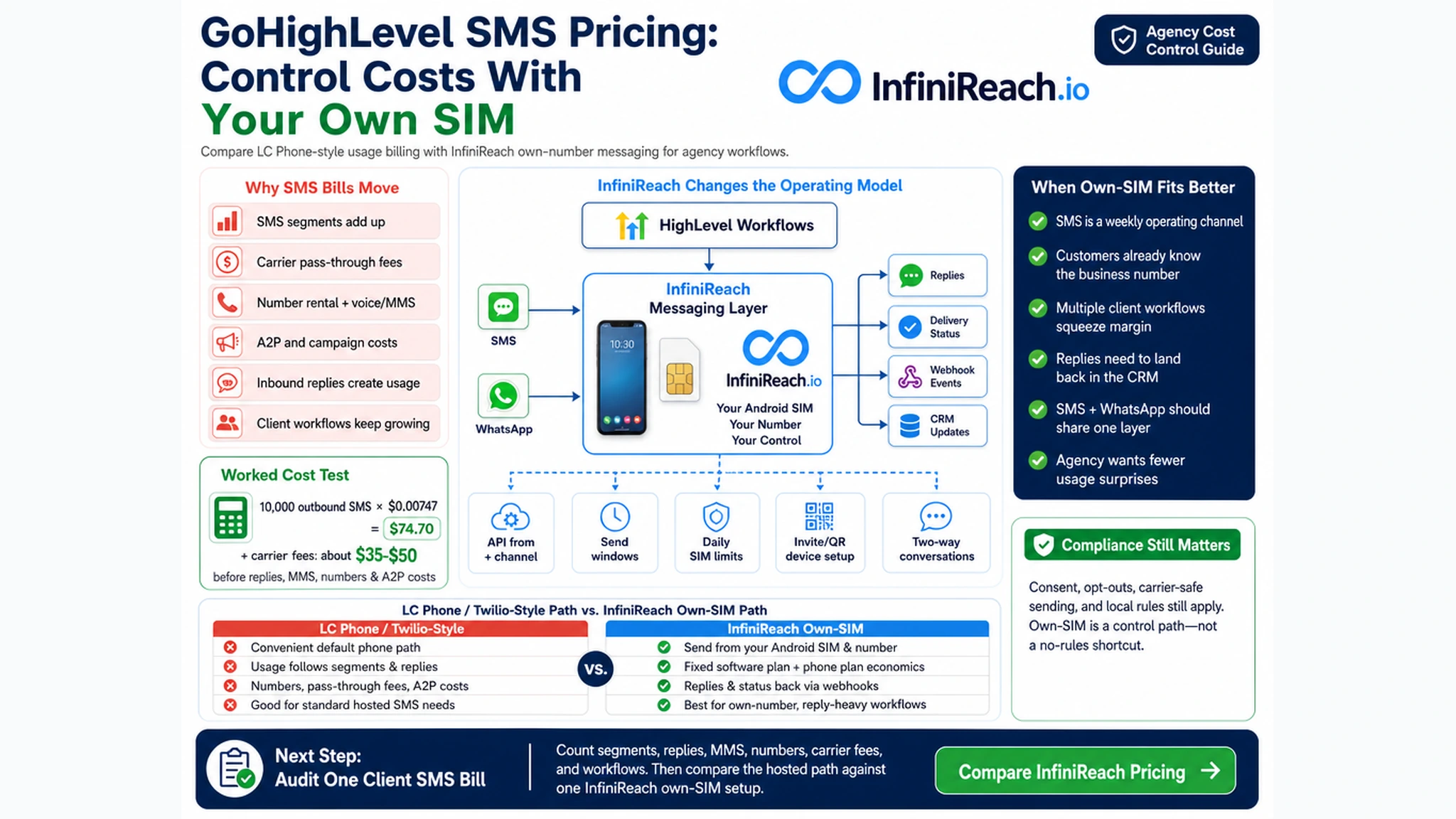
HighLevel support docs describe LC Phone pricing around phone numbers, SMS/MMS segments, carrier pass-through fees, voice charges, A2P 10DLC costs, and agency rebilling. Public snippets list US and Canada SMS at $0.00747 per segment after a discount on the $0.0083 list price, with carrier fees added on top. MMS, replies, local numbers, toll-free numbers, and registration fees can change the real bill again.
InfiniReach changes the operating model. GoHighLevel can still run forms, calendars, pipelines, workflows, and handoffs. InfiniReach becomes the messaging layer: Android SIM for SMS/MMS, connected WhatsApp routing, Mac iMessage Gateway app for Apple Messages conversations, API from and channel control, reply/status webhooks, send windows, and daily SIM limits.
key takeaways
Use this page if you are deciding whether GHL messaging should stay entirely on a usage-billed phone path or move some workflows to owned sender infrastructure.
- GoHighLevel SMS pricing can include segment rates, carrier pass-through fees, phone numbers, MMS, replies, A2P fees, and agency rebilling rules.
- Twilio public US pricing lists long-code SMS at $0.0083 outbound and $0.0083 inbound, MMS at $0.022 outbound, and carrier fees such as $0.0035 to $0.0050 on many outbound long-code SMS segments.
- InfiniReach lets agencies route SMS/MMS through an Android phone and SIM they control instead of using only rented-number, per-message infrastructure.
- The same workflow layer can also route WhatsApp and Mac iMessage, with replies and delivery status sent back through webhooks.
- The right test is workflow math: volume, replies, MMS, sender ownership, compliance duties, and the team that must handle conversations.
why GoHighLevel SMS bills move around
Most agencies can predict the base GoHighLevel plan. The harder line is usage. A dentist adds missed-call text back. A roofer adds estimate follow-up. A med spa sends appointment reminders plus review requests. A client asks for MMS before-and-after photos. None of those changes looks huge alone, but each one adds segments, replies, or media charges.
HighLevel support snippets for LC Phone list US and Canada SMS at $0.00747 outbound and inbound per segment. They also list US MMS at $0.0220 outbound and $0.0165 inbound for local numbers, with toll-free inbound MMS at $0.0200. Phone numbers are another line item; public snippets list US/Canada local numbers at $1.15 per month and toll-free numbers at $2.15 per month. Carrier fees sit on top, and A2P 10DLC registration or monthly campaign charges can apply for US local business texting.
That is not a flaw in HighLevel. It is the normal hosted phone-system model. It works well when convenience matters more than sender ownership or when volume is light. It becomes a margin question when every client workflow is a recurring message machine.
a worked monthly cost check
Run the math on a real sub-account before changing tools. Count outbound SMS segments, expected replies, MMS, numbers, and carrier fees. Do not count messages only. A 260-character reminder may split into more than one billable segment, and a useful two-way workflow creates inbound traffic too.
Example: one agency client sends 12,000 outbound SMS segments and receives 3,000 inbound reply segments in a month. Using the HighLevel support-doc SMS rate of $0.00747, the base SMS line is 15,000 × $0.00747 = $112.05 before carrier pass-through fees, MMS, numbers, voice, A2P costs, or failed-message fees. Add an outbound carrier-fee range of $0.0035 to $0.0050 on 12,000 outbound segments, and that adds about $42 to $60. The working SMS line is already roughly $154.05 to $172.05 before the other usage items.
Twilio public pricing shows the same kind of usage pattern. Its US long-code SMS table lists $0.0083 outbound and inbound, MMS at $0.022 outbound and $0.0165 inbound, plus carrier fees and a $0.001 failed-message processing fee when a message ends in Failed status. InfiniReach changes the comparison from “what is each segment?” to “which owned sender, phone plan, and software plan should carry this workflow?”
- Count outbound and inbound segments separately.
- Separate SMS from MMS before estimating spend.
- Add carrier fees and number rental instead of using the headline rate alone.
- Compare the hosted usage line against one Android SIM, one phone plan, and the InfiniReach plan that matches the agency workflow.
where InfiniReach fits beside GoHighLevel
InfiniReach does not replace the CRM brain. GHL still owns the trigger: new lead, pipeline stage, appointment, missed call, invoice, review request, or reactivation list. InfiniReach owns the message path after the workflow decides to send.
For SMS/MMS, that path is a connected Android phone and SIM. The sender can be a business number the client controls, with device onboarding handled through an invite or QR-style setup. For WhatsApp, the workflow can use the connected WhatsApp route. For iMessage, the correct setup is a Mac signed into Messages running the InfiniReach iMessage Gateway app. It is not iPhone SMS relay, and it does not turn Android SMS into iMessage.
That separation helps agencies keep routing deliberate. A workflow can choose a from number and channel, then use webhook events to return replies and delivery status to the CRM, inbox, or automation stack.
- Android relay app for SMS/MMS through an owned SIM and number.
- WhatsApp routing for workflows where the contact prefers chat.
- Mac iMessage Gateway app for Apple Messages conversations where that channel is appropriate.
- API from and channel fields so automations do not hide sender decisions.
- Webhook replies and status events for CRM updates, staff handoff, and follow-up logic.
how SMS/MMS, WhatsApp, and iMessage change the pricing view
A pure SMS pricing comparison misses how agencies actually message. A lead may answer SMS once, then prefer WhatsApp. A high-trust local customer may recognize the business number and reply by text. An Apple-user conversation may belong in iMessage when the business has the right Mac gateway path. The point is not to force every contact through one channel. The point is to stop treating every customer touch as the same metered SMS segment.
InfiniReach keeps the routing question close to the workflow. Use SMS/MMS through Android SIM when the real number matters. Use WhatsApp where that channel is already part of the customer journey. Use Mac iMessage only through the supported Mac gateway setup. Then decide how replies should update GHL: create a task, pause a campaign, notify a staff member, or branch the next step.
comparison: LC Phone billing vs own-SIM routing
This is not a claim that one path wins every time. It is a way to pick the path that matches the workflow and the agency margin model.
- Default LC Phone path: convenient inside HighLevel, with usage tied to numbers, SMS/MMS segments, carrier pass-through fees, A2P costs, and rebilling rules.
- Twilio direct path: mature API and global infrastructure, but still built around usage pricing, sender setup, carrier fees, and hosted messaging operations.
- Basic own-phone gateways: useful for raw Android SMS sending, but often weaker on agency routing, channel mix, webhooks, send controls, and client operations.
- InfiniReach: owned Android SIM for SMS/MMS, WhatsApp route, Mac iMessage Gateway app, API sender/channel control, reply/status webhooks, send windows, and daily SIM limits.
controls that protect agency margin
The cheapest message is not always the best message. A badly timed workflow, a duplicate import, or the wrong sender can cost more than the segment fee. Agencies need controls before client volume grows.
InfiniReach gives operators controls near the sending layer. Send windows keep automated messages inside the hours you choose. Daily SIM limits prevent one SIM from carrying more work than planned. Webhooks make replies and status events visible to GHL or another system instead of trapping them on a phone. API sender control helps each client or location send from the right number.
- Use send windows for reminders, reactivation, review requests, and campaign batches.
- Set daily SIM limits before adding more clients to one sender.
- Route replies and status events through webhooks for follow-up.
- Keep a sender map for each GHL location, client, or brand.
when the default GoHighLevel path still fits
Stay with the default HighLevel phone path if a client sends low volume, wants the native phone-system workflow, or needs one admin and billing path more than owned sender control. A hosted CPaaS or carrier-grade provider can also be the better answer for global OTP, short codes, very high centralized throughput, direct carrier contracts, or enterprise procurement.
Use InfiniReach when the stronger problem is agency operations: customers recognize the number, replies need to reach the CRM, clients use more than one messaging channel, and the agency wants software and sender costs it can plan before a workflow scales.
a practical setup path for one GHL sub-account
Start with one sub-account and one workflow. Pick a high-signal flow such as missed-call text back, appointment reminders, review requests, or new-lead follow-up. Connect the Android phone and SIM, choose the sender, and send one test SMS/MMS from the number the client owns.
Then wire the rest of the loop: GHL trigger, InfiniReach send request, selected from number, selected channel, reply webhook, status webhook, and human handoff. Add WhatsApp or Mac iMessage only when the customer journey calls for it. Add send windows and daily SIM limits before the workflow runs unattended.
next step: audit one client messaging bill
Pull one month of message activity for a client. Mark outbound SMS segments, inbound replies, MMS, phone numbers, carrier fees, and any A2P-related costs. Then mark which conversations should stay SMS/MMS, which belong on WhatsApp, and which Apple-user threads may fit the Mac iMessage Gateway path.
If the audit points to recognizable senders, reply-aware workflows, channel routing, and fewer usage surprises, compare the InfiniReach pricing page against that one workflow. Do that before moving every GHL sub-account.