SMS API integration: the short answer
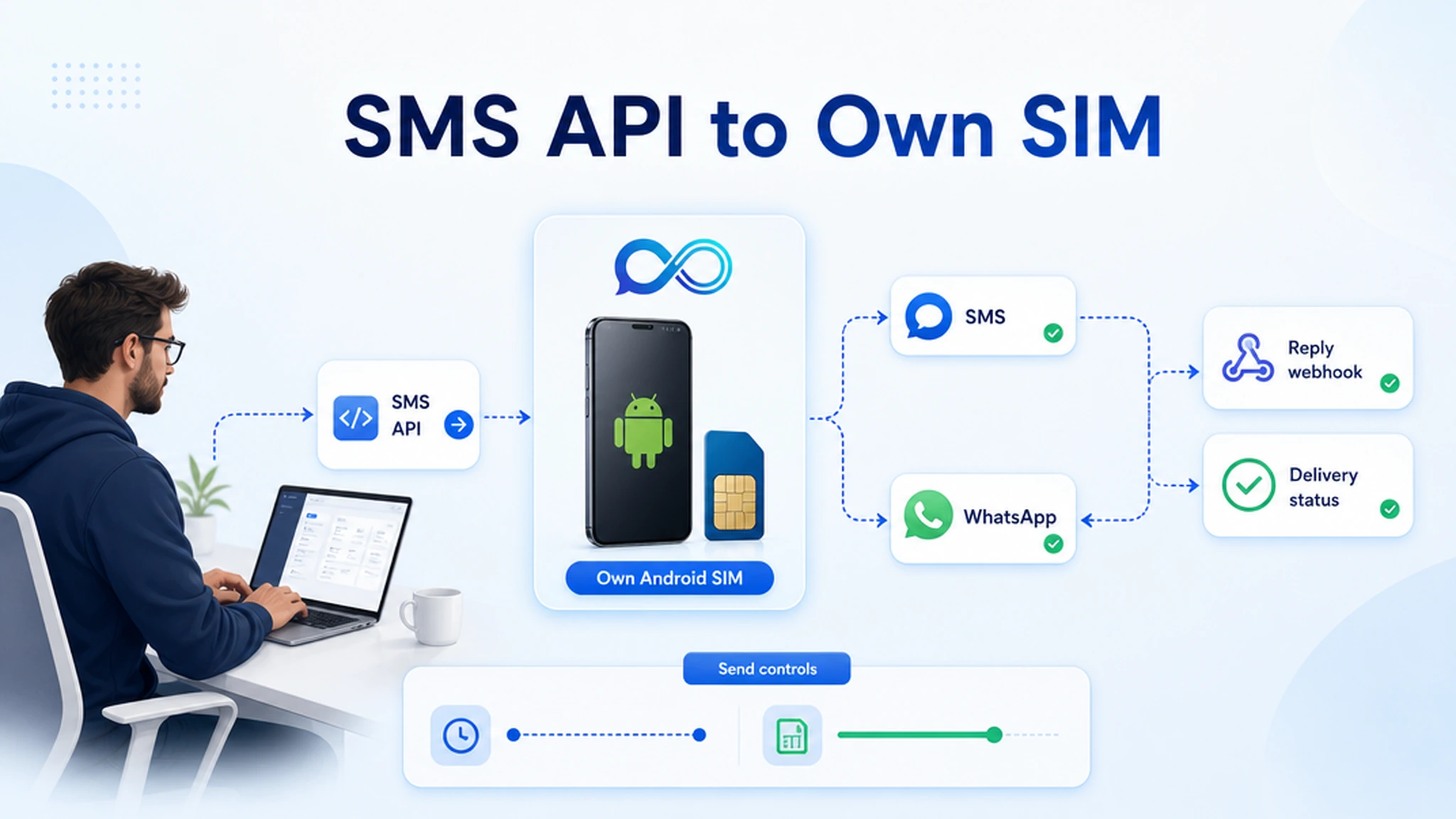
Most SMS API integration pages start and stop at the request: authenticate, send a JSON payload, receive a message ID. That is useful for a demo. It is not enough for a production workflow that needs a known sender, two-way replies, delivery status, send controls, and predictable costs.
InfiniReach sits between your application and the real messaging channel. Your app owns the trigger and business logic. InfiniReach handles the connected Android sender, SMS or WhatsApp route, message history, reply events, status events, send windows, and daily SIM limits.
key takeaways
Use this page if you are deciding how to put SMS inside an app, CRM workflow, or backend service without losing sender control.
- Send SMS through an Android phone, own SIM, and own number instead of defaulting to a rented sender.
- Use API fields like from and channel so your app can choose the sender and SMS or WhatsApp route.
- Bring inbound replies and delivery status back into your product with webhook events.
- Use send windows and daily SIM limits before automated jobs move into client volume.
- Compare per-segment provider math against your phone plan plus InfiniReach software before you build.
why developers search for SMS API integration
The search usually comes from a real product task. A lead comes in and needs a fast text. A payment fails. A missed call needs a follow-up. A CRM status changes. A support ticket needs an urgent update. Developers want the smallest API path that will work once real customers answer back.
Hosted CPaaS providers set the standard for developer docs, SDKs, and global infrastructure. Twilio, for example, publishes United States long-code SMS pricing at $0.0083 outbound and $0.0083 inbound per segment, plus separate notes for carrier fees, A2P 10DLC costs, and a $0.001 failed-message processing fee. That model is a good fit for many global telecom jobs. It is not the only fit when the sender should be the business number and the workflow volume is predictable.
where InfiniReach fits in the developer stack
Think of InfiniReach as the messaging operating layer under your application. Your code decides when to send, who receives the message, which sender should be used, and what the app should do after a reply. InfiniReach gives that code a route through connected devices and channels.
The core API pattern is direct: send a request to POST /api/v1/messages with the recipient, message, from number, and channel. The from and channel fields matter because they stop the sender from being hidden inside a provider account. Your workflow can choose a client number, location number, SMS route, or WhatsApp route on purpose.
- Android relay app for SMS through your own SIM and number.
- Invite or QR onboarding for connected devices and WhatsApp paths.
- POST /api/v1/messages with explicit from and channel control.
- Webhook events for inbound replies and delivery status updates.
- Send windows and daily SIM limits for safer automated sending.
a practical API workflow pattern
A clean integration has four parts: the trigger, the send call, the messaging route, and the return path. The trigger can live in your app, a queue worker, GoHighLevel, n8n, Zapier, Make, or a custom backend. The send call passes the recipient, body, sender, and channel into InfiniReach.
The return path is where many SMS demos fall short. Replies and delivery events should change something: update a contact, stop a sequence, reopen a ticket, notify a human, or log a failed send for review. If the API only sends outbound messages, your team still has to build the conversation layer somewhere else.
- New lead → send a text from the assigned business number.
- Customer replies → webhook updates the CRM and pauses the next automated nudge.
- Message fails → status event creates a task or retries through an approved path.
- Job runs after hours → send window holds the message until the next allowed time.
a cost check before you pick the API
Run the math before you write the integration. At Twilio public US long-code pricing, 10,000 outbound SMS segments and 2,000 inbound segments at $0.0083 per segment equals $99.60 before number rental, carrier fees, A2P 10DLC costs, and other account-specific charges. If 300 messages terminate as failed, Twilio also lists a $0.001 failed-message processing fee, adding $0.30.
With InfiniReach, the calculation starts with the phone plan and SIM you control, then the software plan you need for API access, devices, workspaces, webhooks, WhatsApp routing, and operator controls. The point is not “free SMS.” The point is that the application is not automatically taxed by a platform fee on every segment once the workflow repeats every day.
compare common SMS API integration options
The right option depends on what you need beyond the first successful request. Do not choose by SDK convenience alone. Choose by sender model, reply path, operating controls, and monthly cost exposure.
- Hosted CPaaS: strong for global scale, OTP, short codes, and managed carrier programs; usually usage-metered and tied to provider sender setup.
- Raw Android gateway: useful for direct device control, but your team owns device monitoring, queues, webhooks, UI, reliability, and client routing.
- Spreadsheet or plugin tools: quick for one workflow, but often hide sender choice, status handling, and recurring cost drivers.
- InfiniReach: own-SIM SMS, own-number sending, WhatsApp routing, reply/status webhooks, send windows, daily SIM limits, and CRM-ready workflows.
best-fit use cases for this API
InfiniReach is strongest when the message should feel tied to the business, not to a generic provider number. It is also a good fit when replies have to move back into an app or CRM rather than sit on a phone with no process.
- Lead follow-up from a client-owned or location-owned number.
- Appointment reminders where replies confirm, cancel, or ask for help.
- Missed-call text back tied to the same business number the prospect dialed.
- Agency workflows where each client needs sender discipline and usage control.
- Backend alerts where SMS is primary and WhatsApp belongs in the same routing plan.
when a hosted CPaaS is still the better choice
Do not use an own-SIM path as a compliance shortcut. You still need consent, carrier-aware sending, opt-out handling where required, and local legal review for your market. InfiniReach gives you more control over the sender and workflow; it does not remove those responsibilities.
A hosted CPaaS may be the better fit for global OTP, short-code programs, large carrier-managed sender portfolios, or teams that want a telecom provider to own every registration and infrastructure detail. InfiniReach is a better fit when the goal is API-driven messaging from numbers you control, with replies and status events feeding back into your workflow.
implementation checklist before launch
Before this goes live, test the whole loop. A send endpoint alone is not production readiness. The workflow is ready when sender selection, status handling, reply routing, and limit behavior are all clear.
- Connect one Android phone and SIM with the invite or QR setup path.
- Send one test message with a known from number and channel value.
- Confirm inbound replies and delivery status events reach your webhook endpoint.
- Set send windows and daily SIM limits before importing real volume.
- Document which app, client, or location owns each sender.
next step: test one integration end to end
Pick one workflow with permissioned contacts and a real reply path. Connect one Android phone and SIM, send through the InfiniReach API, and verify that the delivery status and reply webhook land where your team works.
If that test needs own-number sending, explicit sender and channel control, SMS plus WhatsApp routing, and predictable own-SIM economics, start free and price that workflow against your current message volume.