SMS mobile API integration: the short answer
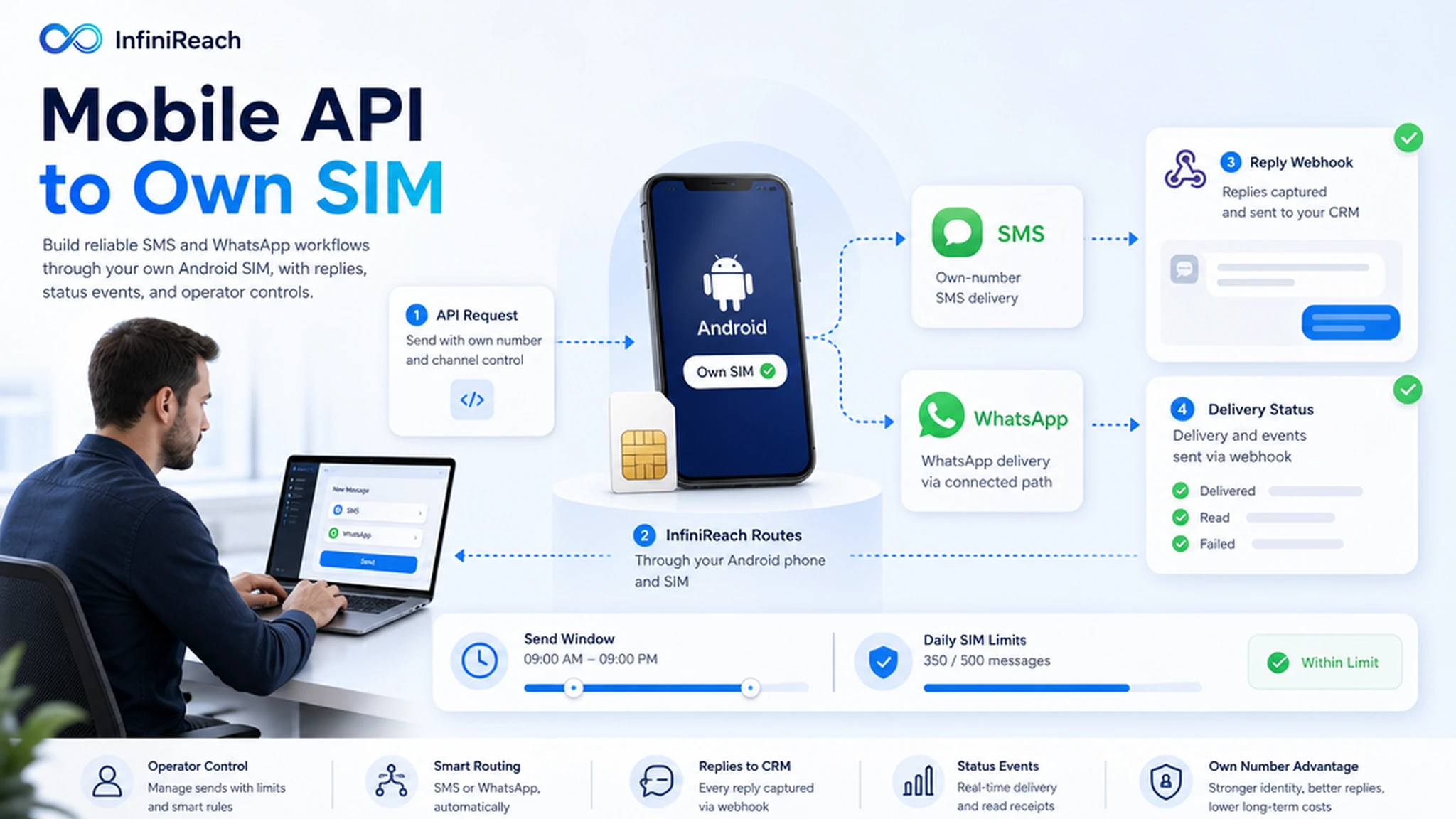
Most mobile SMS API searches start with a simple job: send texts from a phone number through code. The harder buying question comes next. Who owns the sender? Where do replies go? Can the workflow use WhatsApp too? What stops one bad import from overloading a SIM?
InfiniReach answers those operator questions. Your app or automation calls InfiniReach, InfiniReach sends through a connected Android phone and SIM where SMS is the right path, and webhook events bring replies and delivery status back into the system your team already uses.
key takeaways
Use this page if you need a mobile SMS API that can run real workflows, not a demo that stops after one outbound test message.
- Send SMS from an Android phone, own SIM, and own number instead of defaulting to a rented sender.
- Use API sender and channel fields so each workflow can choose SMS or WhatsApp deliberately.
- Bring inbound replies and delivery status back into your CRM or backend with webhooks.
- Use send windows and daily SIM limits before a mobile API workflow reaches client volume.
- Compare API economics against metered providers with real segment math, not vague savings claims.
why teams search for a mobile SMS API
A developer may type the keyword, but the page is usually for an operator. The team has form leads, appointment reminders, missed calls, payment nudges, support updates, or campaign rows that need to trigger a text from software. They want the phone number to be recognizable, replies to be usable, and costs to stay predictable as volume grows.
SMSMobileAPI and other phone-gateway tools validate the demand: turn a mobile phone into an SMS gateway, expose API access, receive inbound messages, and view logs. Twilio and broad CPaaS tools validate the API side: strong docs, carrier reach, and per-message pricing. InfiniReach sits between those two needs: own-device sending with a SaaS operating layer for agencies, CRMs, replies, WhatsApp routing, and sender controls.
where InfiniReach fits in the integration stack
InfiniReach sits between your trigger system and the messaging channel. The trigger can be GoHighLevel, n8n, Make, Zapier, a Python service, a Node.js backend, a webhook, or a CSV-backed campaign. InfiniReach handles the connected sender, message history, reply path, delivery status, and channel choice.
That split keeps the integration clean. Your system does not need to become a device manager. It only needs to pass the recipient, message, sender, and channel into InfiniReach, then listen for the webhook events that matter after the message leaves.
- Android relay app for SMS through your own SIM and number.
- Invite or QR setup for connecting devices and WhatsApp paths.
- API sending with explicit sender and channel control for SMS and WhatsApp.
- Webhook events for inbound replies and delivery status updates.
- Send windows and daily SIM limits to keep automated sends under control.
a practical mobile SMS API pattern
A good first workflow has four parts: the business trigger, the send request, the owned sender, and the reply path. For example, a form submission creates a lead in the CRM. The CRM or automation tool calls InfiniReach. InfiniReach sends from the assigned Android SIM or WhatsApp path. A reply or status event then updates the same lead record.
This is where explicit sender control matters. If an agency manages several locations, the API request should not hide the sending number. InfiniReach supports the pattern buyers expect from a serious API: choose the sender, choose the channel, and keep the downstream webhook path visible.
- New lead → send from the location number the lead recognizes.
- Customer replies → webhook updates the CRM and notifies the owner.
- Delivery status changes → backend records the result for follow-up logic.
- After-hours trigger fires → send window holds the message until the allowed time.
a simple cost check before you choose the API
Public Twilio messaging pricing lists U.S. SMS starting at $0.0083 per outbound or inbound long-code message. Twilio also describes pricing as a mix of monthly volume, API, sender, and channel fees, with phone-number fees starting at $1.15 per month and carrier fees added where applicable. Those numbers are useful because they turn “cheap SMS API” into a real monthly bill.
If a workflow sends 10,000 outbound segments and receives 2,000 inbound replies in a month, the Twilio SMS line alone is 12,000 × $0.0083 = $99.60 before phone-number, carrier, registration, and other account fees. With InfiniReach, the comparison is different: price the Android phone plan, SIM, and InfiniReach software plan for the workflow. The carrier still matters, but InfiniReach is designed so the platform itself is not charging a new per-message fee on every segment.
compare common SMS mobile API options
The right path depends on what you need after the first request succeeds. Do not compare only the code sample. Compare sender ownership, reply handling, WhatsApp coverage, operator controls, and who carries the usage risk.
- Twilio-style CPaaS: strong global API coverage and mature docs, but usually built around rented or registered senders, usage pricing, sender fees, carrier fees, and A2P/10DLC setup for U.S. long-code SMS.
- Raw phone gateway: close to the own-mobile-phone idea, but your team may still own monitoring, device operations, API glue, and CRM handoff.
- SMS-only mobile API: useful when the job is narrow SMS sending, but weaker when WhatsApp, reply workflows, and agency sender maps matter.
- InfiniReach: own-SIM SMS plus WhatsApp routing, API sender/channel control, reply/status webhooks, send windows, daily SIM limits, campaigns, and GoHighLevel-ready operations.
best-fit workflows for this setup
InfiniReach fits workflows where the number is part of the relationship. If a customer can answer the message, the reply should not vanish into a phone inbox or a provider log. It should land where your team works.
- Lead follow-up from a client-owned or location-owned number.
- Appointment reminders where customers can confirm or reschedule by reply.
- Missed-call text back tied to the same number the prospect just dialed.
- Payment or quote follow-up where WhatsApp and SMS may both be needed.
- Agency workflows that separate senders by client, location, or campaign.
when a hosted CPaaS may still be the better choice
Use a broad CPaaS when you need specialized global telecom coverage, short codes, high-volume enterprise throughput, OTP infrastructure, or a fully hosted sender model with carrier relationships handled inside that provider. InfiniReach is not a promise to ignore consent, carrier policies, A2P rules, or local messaging laws.
InfiniReach is the better fit when the business value is sender ownership, own-SIM SMS, WhatsApp alongside SMS, reply-aware CRM workflows, and margin control for recurring business messaging. It gives operators another path, not a compliance shortcut.
what to avoid before going live
A mobile SMS API can make sending too easy. Before you connect a form, spreadsheet, CRM, or campaign import, make sure the operating rules are clear.
- Do not launch a large workflow until reply and status webhooks are tested end to end.
- Do not mix client or location senders unless the API routing rule is explicit.
- Do not treat own-SIM sending as unlimited sending; set daily SIM limits and respect carrier terms.
- Do not message contacts without the consent and business purpose required in your market.
next step: price and test one workflow
Pick one workflow with a real business reason to text: a new lead, missed call, appointment reminder, payment nudge, or support update. Connect one Android phone and SIM, send through the InfiniReach API, then confirm that replies and status events return to your CRM or backend.
If that test needs own-number sending, SMS plus WhatsApp, webhook replies, and spend you can forecast, start with the free plan and price the workflow against your current per-message API path.