Who needs to act
If your SMS Gateway app is 0.9.x or 0.75.x (or any version older than 0.78.2), update to 0.78.2 or newer and re-allow permissions as described below. If you are already on 0.78.2 or newer, you have nothing to do here.
To check your version: open the Android Settings app, go to Apps, select SMS Gateway, then open App details. The version is shown at the top.
What is changing
- Breaking change. Older versions got SMS access from being the default SMS app. Android removes that access when the app is no longer the default. After updating, you allow SMS and Phone permissions yourself, once.
- No re-pairing. Your device stays linked to your InfiniReach workspace. Your connection token is kept.
Why we made this change
- It stays on Google Play. Google Play reviewed the earlier build as an SMS handler rather than a gateway. The new build sends and receives through the permissions a gateway needs and does not ask to be the default SMS app.
- You keep your messages app. You no longer have to make SMS Gateway your default SMS app. Keep Google Messages (or your phone maker's app) for everyday texts.
- Clear permission status. If a permission is missing, the dashboard shows an SMS permission needed badge and the phone shows a notification, instead of messages failing silently.
When you can update
- From Saturday 24 October 2026, 00:00 GMT, updates are open for SMS Gateway.
- Google Play rolls out updates gradually, so the update may not show up on your phone straight away. You do not need to wait for it: you can update manually as soon as updates are open.
- Either way works: let Google Play update the app automatically, or update it now from the Play Store.
After you update: allow permissions
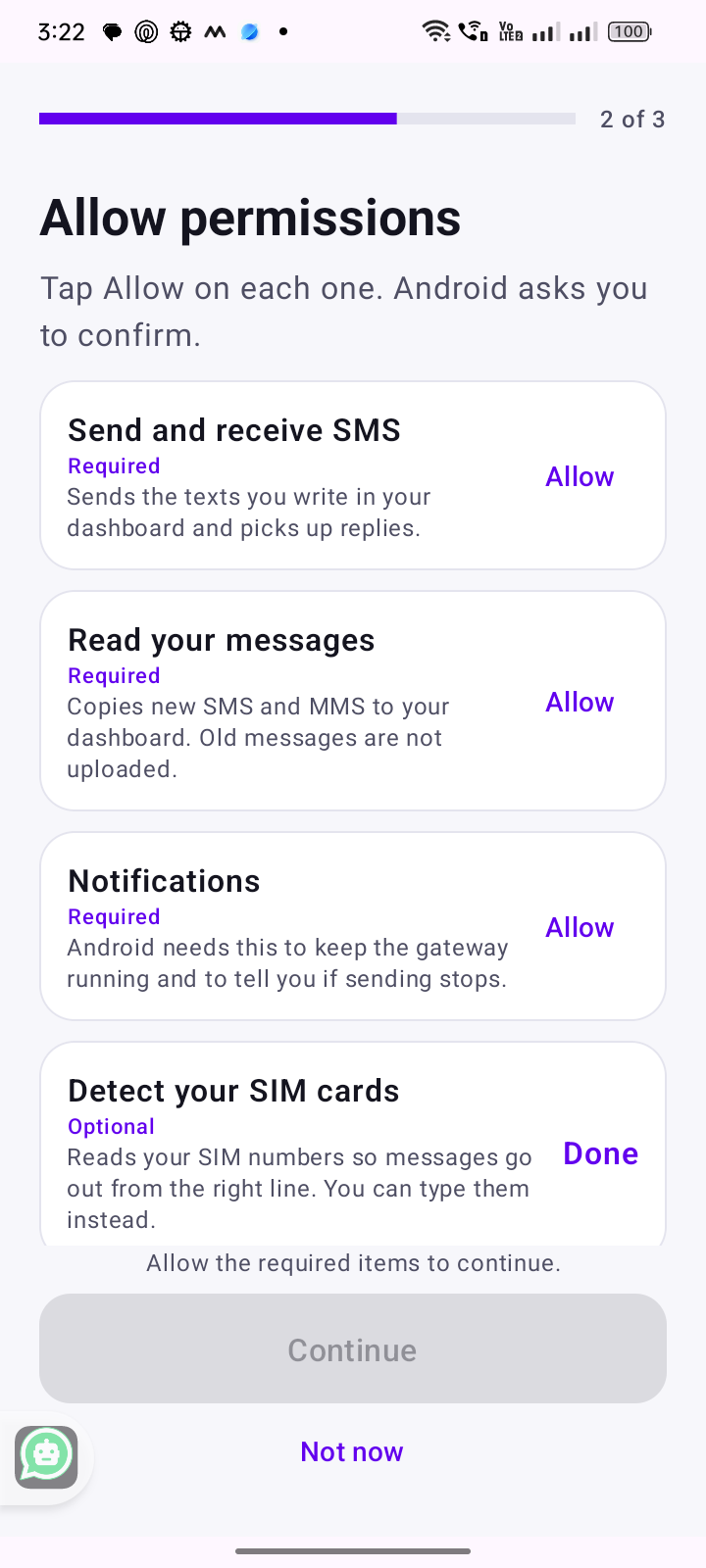
Open SMS Gateway and allow each permission it asks for:
- Send and receive SMS (required): sends the texts you write in your dashboard and picks up replies.
- Read your messages (required): copies new SMS and MMS to your dashboard. Old messages are not uploaded.
- Notifications (required): Android needs this to keep the gateway running and to tell you if sending stops.
- Detect your SIM cards (optional): reads your SIM numbers so messages go out from the right line. You can type them instead.
If you skip a permission
Messages that need that permission fail with an SMS permission denied error. The dashboard shows an SMS permission needed badge on the device until you allow it.
Questions
Do I have to make SMS Gateway my default SMS app?
No. You can keep your usual messages app as the default.
Will I lose my messages or my device connection?
No. Your device stays linked to your workspace. You only re-allow the permissions.
Do I need to pair the device again?
No.
My phone has not offered the update yet. What now?
Google Play rolls out gradually. Open the Play Store link above and tap Update, or wait for the automatic update.