key takeaways
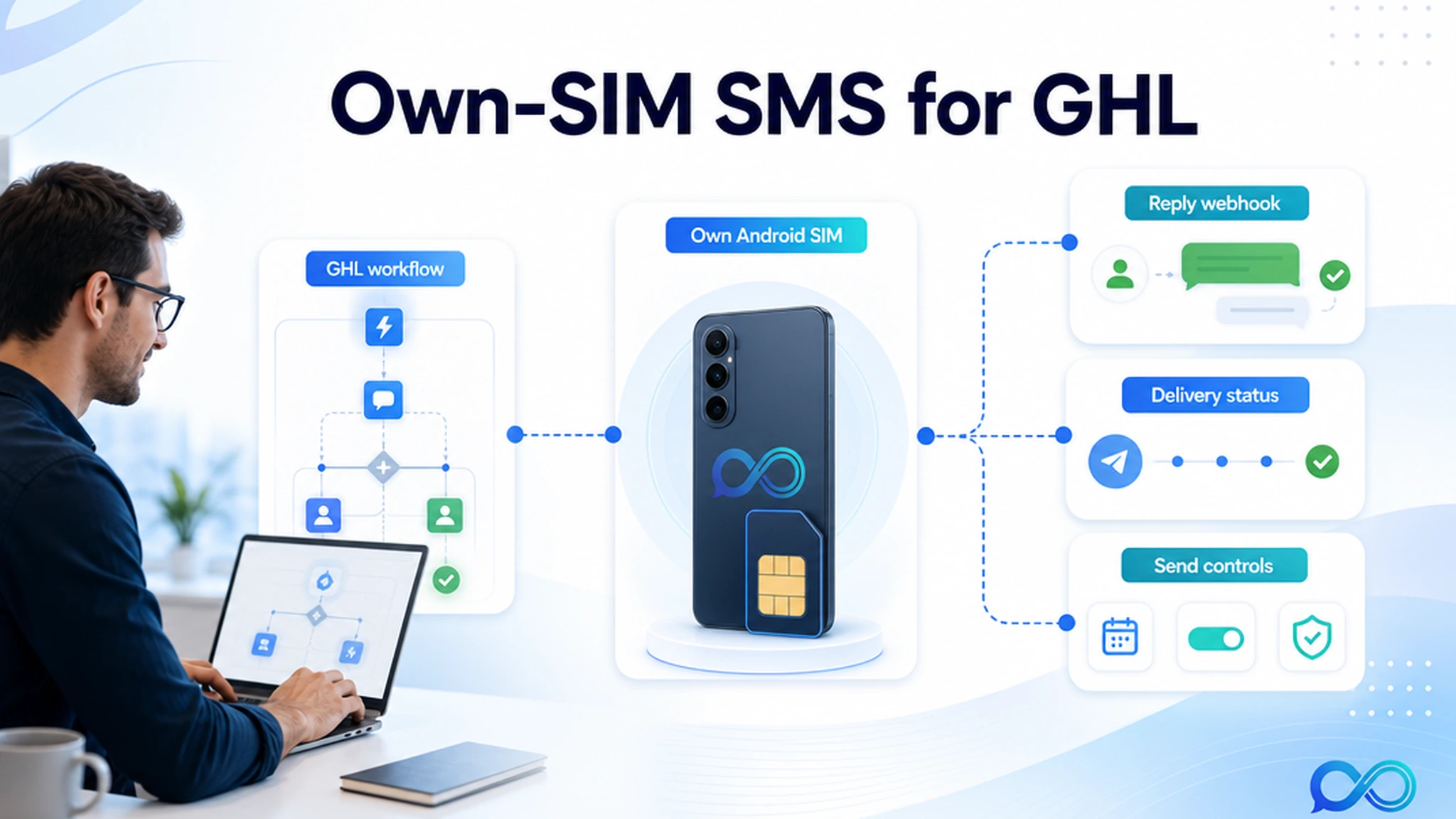
Use this page if you already run GoHighLevel workflows and want SMS to come from a number the client owns. InfiniReach sits between GHL and the sending device: GoHighLevel triggers the workflow, InfiniReach routes the message through the connected Android SIM, and replies or status events can come back into the operating stack.
- Connect a real Android phone and SIM instead of depending only on hosted A2P SMS senders.
- Send from a recognizable business number for lead follow-up, reminders, missed-call text back, and client campaigns.
- Use reply/status webhooks, send windows, and daily SIM limits so GHL workflows stay manageable after launch.
- Use SMS and WhatsApp in the same messaging stack when the client workflow needs more than one channel.
why GHL agencies search for own-SIM SMS
The buyer is usually not shopping for a generic SMS tool. They already have GoHighLevel. The problem is the transport layer behind the workflow: rented numbers, sender approval, segment charges, carrier pass-through fees, and replies that need to land somewhere useful.
For agencies, those small costs and gaps multiply by sub-account. A missed-call workflow for one dentist is fine. The same workflow across twenty local clients becomes a margin and operations question. Which number sends? Who sees replies? What happens when one location sends too many messages? Who pays for every segment?
what changes when the sender is your own SIM
With InfiniReach, the sender can be a connected Android phone and SIM that the business controls. Customers see the real business number where that setup fits the client, consent, and carrier rules. The agency still keeps the workflow logic in GoHighLevel instead of asking staff to text from a handset.
That split is the point. GoHighLevel handles forms, pipelines, calendars, triggers, reputation flows, and handoff logic. InfiniReach handles own-number messaging, channel routing, delivery status, replies, and sender controls.
- Own SIM and own number for SMS from a business-controlled sender.
- Android relay app for sending and receiving SMS through that connected device.
- Invite or QR-style device onboarding instead of a homegrown relay script.
- SMS plus WhatsApp coverage for workflows that should not live in separate tools.
a worked cost check for one agency workflow
Public Twilio pricing for US long-code SMS lists $0.0083 to send and $0.0083 to receive a segment, before carrier fees and other applicable charges. Twilio also documents a $0.001 failed-message processing fee in its pricing notes. Those are small numbers until a GHL workflow runs every day.
Example: an agency runs appointment reminders, review requests, and missed-call follow-up across client locations. At 15,000 outbound segments and 3,000 inbound reply segments in a month, the base Twilio-style segment math is 18,000 × $0.0083 = $149.40 before carrier fees, phone numbers, registration/onboarding fees, failed-message fees, and agency support time. InfiniReach changes the question from “what does each segment cost?” to “which client-owned phone plan, SIM, and software plan should carry this workflow?”
That does not mean every message is free or that compliance disappears. It means the agency can evaluate the workflow around owned sender infrastructure and predictable software cost instead of treating every GHL automation as a per-message tax.
how the GoHighLevel workflow maps to InfiniReach
A clean production setup starts with one workflow. Pick a trigger in GoHighLevel, choose the sender, decide whether the message is SMS or WhatsApp, then define where replies and status events should go.
InfiniReach supports API-style sends with explicit sender and channel control. That matters when an agency manages multiple client numbers or locations. The workflow should not accidentally send from the wrong SIM just because a trigger fired in the wrong sub-account.
- GHL trigger: new lead, missed call, appointment due, invoice reminder, or review request.
- InfiniReach sender: selected client number, connected Android SIM, and channel path.
- Outbound message: sent from the chosen own number where permitted by the workflow rules.
- Webhook loop: replies and delivery/status events can feed CRM updates, human handoff, or automation branches.
comparison checklist: LC Phone, Twilio, or own-SIM SMS
The right answer depends on what the agency is optimizing. Hosted CPaaS paths are useful for many global, regulated, or high-throughput messaging programs. InfiniReach is for the operator who wants GoHighLevel workflow control tied to owned sender infrastructure.
- Sender ownership: hosted SMS paths use registered or rented sender infrastructure; InfiniReach can use the client-owned Android SIM and number.
- Cost behavior: metered providers bill by usage components; InfiniReach is designed for fixed-cost-friendly own-SIM operations.
- Reply handling: basic outbound setups can leave replies detached; InfiniReach supports two-way conversations and webhook events.
- Channel coverage: SMS-only setups need another path for WhatsApp; InfiniReach keeps SMS and WhatsApp closer to the same workflow layer.
- Operational controls: own-phone hacks stop at “send”; InfiniReach adds send windows, daily SIM limits, message history, and campaign controls.
GHL workflows that fit this model
Own-SIM SMS works best when the sender relationship matters. If the message should feel like it came from the local office, clinic, shop, or salesperson, a real business number can be a better fit than a generic rented sender.
- Missed-call text back from the number prospects just tried to call.
- Appointment reminders where staff need to see replies and reschedule requests.
- Review requests from a client-owned local number after a completed job.
- Lead follow-up sequences where the first reply should pause or branch the campaign.
- Agency client campaigns where each location needs its own sender map and daily limits.
what to avoid before going live
Do not position own-SIM messaging as a compliance loophole. You still need permission, relevant use cases, opt-out handling, and respect for carrier and local rules. InfiniReach gives operators a practical own-number path; it does not remove the duty to message responsibly.
Also avoid routing every client through one device just because it works in a test. Use sender maps, send windows, and daily SIM limits before the workflow becomes a live client operation.
- Do not mix client locations through the wrong phone or SIM.
- Do not ignore inbound replies; route them to a person, pipeline, or workflow branch.
- Do not send after-hours reminders without checking send windows and local expectations.
- Do not treat WhatsApp and SMS as identical channels; pick the channel intentionally.
when a hosted SMS provider is still the better fit
Use a traditional CPaaS or carrier-grade provider when you need global OTP delivery, short codes, very high centralized throughput, direct carrier contracts, or a formal hosted messaging program with its own compliance and registration process. Those are valid needs.
Choose InfiniReach when the stronger problem is GoHighLevel operations: client-owned numbers, own Android SIM sending, SMS plus WhatsApp routing, reply/status webhooks, send controls, and agency economics that should not scale only by segment count.
next step: price one GHL workflow
Pick one active GoHighLevel workflow and write down five things: monthly outbound segments, expected replies, sender number, channel path, and who handles replies. Then compare the metered provider math against an InfiniReach setup using the client-owned Android phone, SIM, and software plan.
If the workflow needs a recognizable sender, reply handling, SMS plus WhatsApp options, and predictable agency costs, start with the pricing page or book a demo to map that workflow before moving the rest of the account.