GoHighLevel SMS integration: the short answer
Most GoHighLevel SMS setups answer the same narrow question: which provider will send the text when a workflow fires? The better agency question is different: whose number is the customer seeing, where do replies land, and what happens to margin when every lead, reminder, and reactivation message becomes metered usage?
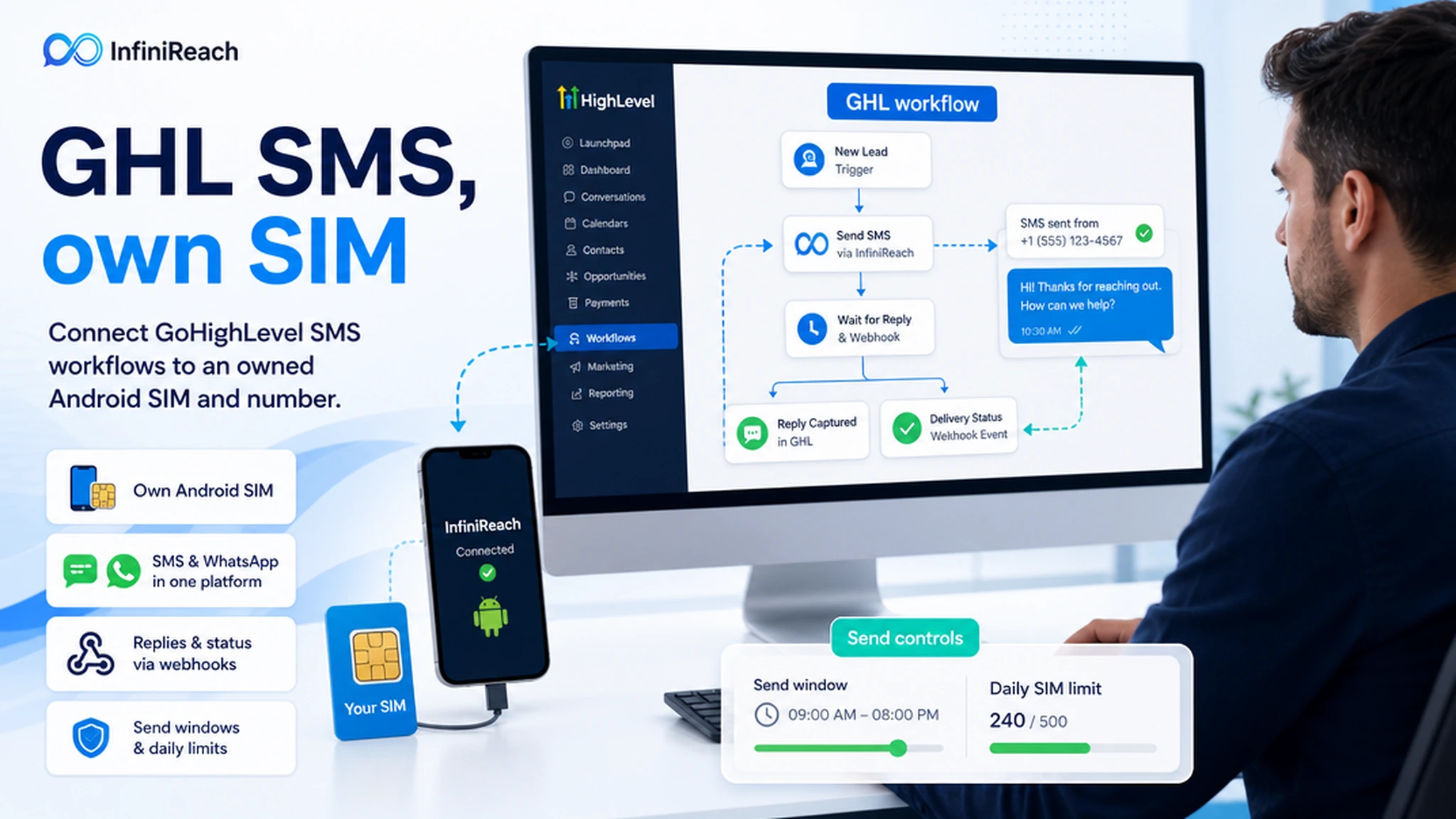
InfiniReach fits between GoHighLevel and the real sender. GoHighLevel keeps the workflow logic. InfiniReach handles the connected Android SIM, sender choice, API routing, replies, delivery events, WhatsApp routing where needed, send windows, and daily SIM limits.
key takeaways
Use this page if GoHighLevel is already your CRM, but the default SMS path feels too rented, too metered, or too hard to control across client workflows.
- Send GoHighLevel SMS through your own Android phone, SIM, and business number where that setup fits your consent and carrier rules.
- Use InfiniReach as the messaging layer behind workflows, webhooks, missed-call text back, reminders, and client campaigns.
- Keep replies and delivery status usable instead of treating SMS as a one-way notification pipe.
- Compare usage-billed SMS against a phone plan plus InfiniReach software before scaling client workflows.
why agencies search for GoHighLevel SMS integration
The search intent is usually not academic. A team has a live GoHighLevel account, a workflow that should text leads or customers, and a decision to make about sender setup. They may be comparing LC Phone, Twilio-style metered SMS, marketplace conversation providers, or a custom webhook route.
The risk is that SMS becomes a hidden tax on every automation. One missed-call text back flow is harmless. Ten client accounts, appointment reminders, quote follow-ups, review requests, and failed-payment nudges can create a recurring usage line that is hard to explain to clients.
That is why the integration decision should include sender ownership and reply routing from the start. A recognizable business number can make replies easier for staff, while webhook events make those replies usable inside the CRM or workflow stack.
where InfiniReach fits in the GoHighLevel stack
InfiniReach is not a replacement for GoHighLevel. It is the owned-number messaging layer under GoHighLevel workflows. The CRM still owns contacts, opportunities, triggers, pipelines, and automation branches. InfiniReach owns the connected device path, message sending, channel choice, reply capture, and delivery/status events.
That split is useful for agencies. A client can keep a familiar number, while the agency still gets an API and workflow-friendly system instead of asking staff to send texts manually from a phone.
- Android relay app for SMS through your own SIM and number.
- Invite or QR-based registration for devices and WhatsApp paths.
- API sends with explicit `from` and `channel` control when a custom workflow needs it.
- Webhook events for replies and delivery status, so GoHighLevel or another CRM can react.
- Send windows and daily SIM limits to keep sender usage intentional.
three practical GoHighLevel SMS patterns
Start with one workflow that has a clear business result. Do not move every automation at once. Prove the full loop first: outbound send, reply, status event, CRM update, and human handoff when needed.
- Lead follow-up: a form submit or pipeline stage change triggers SMS from the client-owned number, then replies are routed back for staff action.
- Missed-call text back: the workflow sends a fast response from the same business number prospects already called.
- Appointment reminders: GoHighLevel owns timing and contact logic, while InfiniReach sends through the selected SIM and returns reply/status events.
- Reactivation or review request campaigns: use send windows and daily SIM limits before scaling a CSV or smart-list workflow.
a simple monthly cost check before you scale
Twilio currently lists US long-code SMS at $0.0083 outbound and $0.0083 inbound per segment, with additional carrier fees possible and a $0.001 failed-message processing fee for messages that end in Failed status. AWS SNS publishes 10DLC registration and monthly examples such as a $4 company registration fee, a $10 monthly regular 10DLC campaign fee, and a $1 monthly 10DLC phone number fee. Those are not GoHighLevel-specific bills, but they show how hosted SMS economics are usually built: segments, senders, carrier or registration items, and usage that grows with each workflow.
Run a small model before choosing the integration path. If an agency sends 10,000 outbound segments and receives 2,000 inbound replies in a month, the Twilio benchmark alone is 12,000 × $0.0083 = $99.60 before other carrier, number, registration, or platform charges. With InfiniReach, the question changes: what does the client phone plan plus InfiniReach software cost for that workflow, and do the sender ownership and reply path justify moving it to an own-SIM model?
This is not a promise that every own-SIM setup is cheaper in every country or use case. It is a better decision frame for agencies that send recurring operational SMS from known local numbers and want predictable client margins.
comparison checklist: hosted SMS vs own-SIM InfiniReach
A hosted CPaaS or LC Phone-style path can be the right fit when you need managed telecom infrastructure, formal sender registration, short codes, global OTP, or carrier-grade throughput. InfiniReach is stronger when the GoHighLevel workflow benefits from sender ownership, SMS plus WhatsApp routing, and operator control over a real business number.
- Sender identity: hosted SMS often uses registered or rented sender paths; InfiniReach can use the Android SIM and number the business controls.
- Cost model: hosted SMS exposes per-segment usage; InfiniReach is built for fixed-cost-friendly workflows around connected devices.
- Reply path: basic send actions stop at outbound delivery; InfiniReach supports two-way conversations, replies, status events, and webhooks.
- Channel coverage: SMS-only tools may need another WhatsApp setup; InfiniReach keeps SMS and WhatsApp in one messaging stack.
- Agency operations: InfiniReach fits teams managing many client workflows, sender maps, send windows, and daily SIM limits.
a clean setup path for one client workflow
The safest first build is small. Pick one client, one sender, and one automation that already has permission to message contacts. Then prove the mechanics before broadening the integration.
- Connect the client Android phone and SIM in InfiniReach with the invite or QR flow.
- Choose the first workflow in GoHighLevel: lead follow-up, missed-call text back, reminders, or review requests.
- Map the sender, channel, reply destination, and fallback rule before sending production traffic.
- Use API or webhook paths when the workflow needs explicit sender/channel control or status events.
- Add send windows and daily SIM limits before increasing message volume.
what to avoid before going live
The easiest mistake is treating GoHighLevel SMS as a broadcast checkbox. The workflow may be automated, but the sender is still a real customer communication channel. Consent, reply handling, quiet hours, sender assignment, and staff handoff still matter.
- Do not imply an own-SIM route removes compliance responsibilities. Check consent, local law, and carrier rules.
- Do not send every client through one sender. Keep business numbers, workspaces, and workflows deliberately mapped.
- Do not ignore replies. Route them into a conversation, CRM task, or human handoff.
- Do not scale reactivation sends before testing send windows, daily SIM limits, and status webhooks.
next step: price one GoHighLevel SMS workflow
Pick one workflow that runs every week. Count expected outbound segments, expected replies, sender needs, and the staff action after a reply. Then compare the hosted usage path against a connected Android SIM plus InfiniReach.
If the workflow needs a known business number, predictable operator costs, SMS plus WhatsApp routing, and webhook-based replies, InfiniReach is the GoHighLevel SMS integration worth testing first. Start with pricing, or book a demo to map one workflow end to end.