GoHighLevel WhatsApp integration: the short answer
A useful GoHighLevel WhatsApp integration does more than send one WhatsApp message from a workflow. It needs a sender decision, a fallback path when SMS is the better channel, and a reply path that gets back into the CRM instead of disappearing in a side inbox.
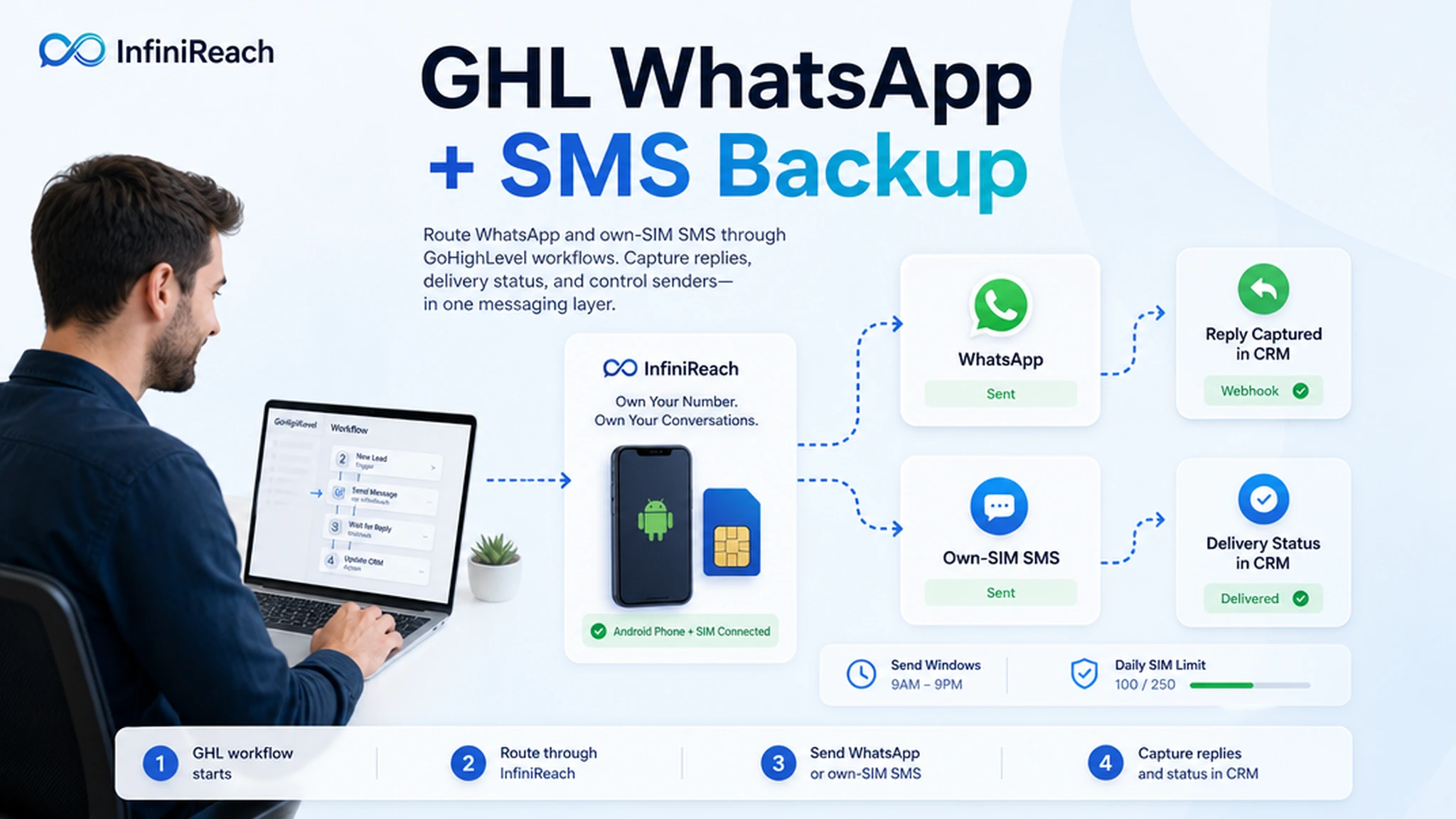
InfiniReach sits between GoHighLevel and the sending channels. GoHighLevel keeps the lead, appointment, pipeline, and automation logic. InfiniReach handles own-number SMS through an Android relay, WhatsApp routing, delivery status, inbound replies, and sender controls such as send windows and daily SIM limits.
key takeaways
Use this page if you are deciding whether to connect WhatsApp to GoHighLevel through a WhatsApp-only tool, LC Phone/Twilio-style messaging, or an InfiniReach own-number setup.
- InfiniReach gives GoHighLevel workflows SMS plus WhatsApp from one operating layer, not two disconnected tools.
- SMS can come from your own Android phone and SIM, so fallback messages use a sender you control.
- API fields such as from and channel let workflows choose the sender and message path deliberately.
- Reply and delivery-status webhooks make WhatsApp and SMS usable for follow-up, assignment, and reporting.
- This is not a compliance shortcut. It is an own-number routing path for teams that still follow consent and carrier rules.
why GHL teams search for WhatsApp integration
Most buyers are not looking for a generic WhatsApp definition. They already have GoHighLevel workflows and want those workflows to reach people where replies actually happen. The practical use cases are missed-call follow-up, appointment reminders, quote nudges, review requests, support handoff, and reactivation messages.
The problem is that WhatsApp-only tools can create another channel silo. A lead answers in WhatsApp, a reminder still needs SMS, and the agency now has to explain which sender, inbox, and billing model belongs to which client. InfiniReach keeps that decision closer to the CRM workflow.
where InfiniReach fits in the GHL workflow
Think of InfiniReach as the messaging transport layer for GoHighLevel. GoHighLevel triggers the workflow. InfiniReach decides how the message leaves: WhatsApp, own-SIM SMS, or a deliberate channel path set by the workflow.
That matters for agencies because client workflows rarely stay single-channel. A WhatsApp nudge may work for a warm lead. A local SMS from the business number may be better for a missed call. A reply should update the conversation owner either way.
- Connect an Android phone and SIM for own-number SMS relay.
- Use WhatsApp routing alongside SMS instead of running a separate WhatsApp-only stack.
- Send through API calls with explicit from and channel values when the workflow needs control.
- Route replies and delivery status back through webhooks for CRM updates and human handoff.
comparison checklist: WhatsApp-only tool vs InfiniReach
WAGHL positions itself as WhatsApp for GoHighLevel, with public copy advertising pricing from $19 per month per sub-account and a 10-minute setup. That may fit teams that only want WhatsApp inside HighLevel. InfiniReach is the better fit when WhatsApp is one channel in a broader messaging operation.
- Channel coverage: WhatsApp-only tools focus on WhatsApp; InfiniReach supports WhatsApp plus own-SIM SMS in the same workflow layer.
- Fallback path: a WhatsApp-only setup needs another tool for SMS; InfiniReach can keep SMS fallback close to the same sender, reply, and webhook model.
- Sender ownership: hosted or add-on channels can drift away from the client number; InfiniReach is built around numbers and SIMs the operator controls.
- Reply handling: simple sends are not enough; InfiniReach routes inbound replies and status events back to automations.
- Operator controls: send windows and daily SIM limits help keep own-number sending controlled when workflows move from testing to client volume.
a quick cost check before you pick a path
Pricing is not the only reason to choose an integration, but it changes agency margins fast. Twilio publicly lists US long-code SMS at $0.0083 to send and $0.0083 to receive, before other pass-through costs that can apply. It also documents a $0.001 failed-message processing fee for failed messages.
A workflow with 8,000 SMS fallback segments in a month would put the raw Twilio SMS line at $66.40 before carrier, registration, phone-number, or platform charges. If that fallback volume belongs to one client, the number may look small. Across 20 subaccounts, the same pattern becomes an agency margin question.
With InfiniReach, the cost test is different. Price the phone plan, the SIM/device setup, and the InfiniReach software plan against the workflow volume you expect. If you already want client-owned senders, reply webhooks, WhatsApp routing, and controlled SMS fallback, the own-SIM model is often easier to budget than per-message platform billing.
a practical setup path for one GHL workflow
Start with one workflow. Do not begin by moving every client and every automation at once. The first test should prove the full loop: trigger, sender, channel, delivery status, inbound reply, and CRM action.
- Pick a GoHighLevel workflow such as missed-call text back, appointment reminder, or review request.
- Connect the Android device and SIM in InfiniReach through the invite or QR registration flow.
- Choose the sender and channel for the first message: WhatsApp, SMS, or a fallback branch.
- Send the message through InfiniReach with the intended from and channel values.
- Route reply and status webhook events back into the CRM so the conversation owner can act.
- Add send windows and daily SIM limits before raising volume across more clients.
when this is the better GoHighLevel WhatsApp path
InfiniReach is strongest when the agency needs WhatsApp and SMS to behave like one operational system. That usually means recognizable senders, two-way replies, delivery status, and a clear way to map each client or location to the right number.
Use a narrow WhatsApp-only tool if all you need is a single WhatsApp inbox or a few outbound WhatsApp workflow steps. Use a classic CPaaS if you need global sender infrastructure, short codes, OTP scale, or a hosted compliance program. Use InfiniReach when own-number SMS plus WhatsApp routing is the actual job.
what to avoid before going live
The common failure is treating WhatsApp integration as a button instead of a conversation system. A workflow can send the first message and still fail if replies go nowhere, the wrong sender is used, or the agency cannot explain the fallback rule to the client.
- Do not mix client senders. Keep each location tied to the right number and device.
- Do not ignore replies. If a prospect answers, route the reply to the owner or automation that can act.
- Do not promise compliance shortcuts. Keep consent, opt-out handling, and carrier rules in the operating plan.
- Do not scale volume before send windows, daily SIM limits, and delivery-status checks are working.
next step: price and map one workflow
Pick one GoHighLevel workflow and write down four things: the sender, the first channel, the fallback channel, and where replies should land. If the map needs WhatsApp, own-SIM SMS, reply/status webhooks, and predictable sender control, compare InfiniReach plans or book a demo to walk through that workflow.