GoHighLevel conversation provider: the short answer
A GoHighLevel conversation provider decision is really a sender decision. Who owns the number? Where do replies land? What does each client workflow cost once missed-call text back, reminders, review requests, and reactivation campaigns start running every week?
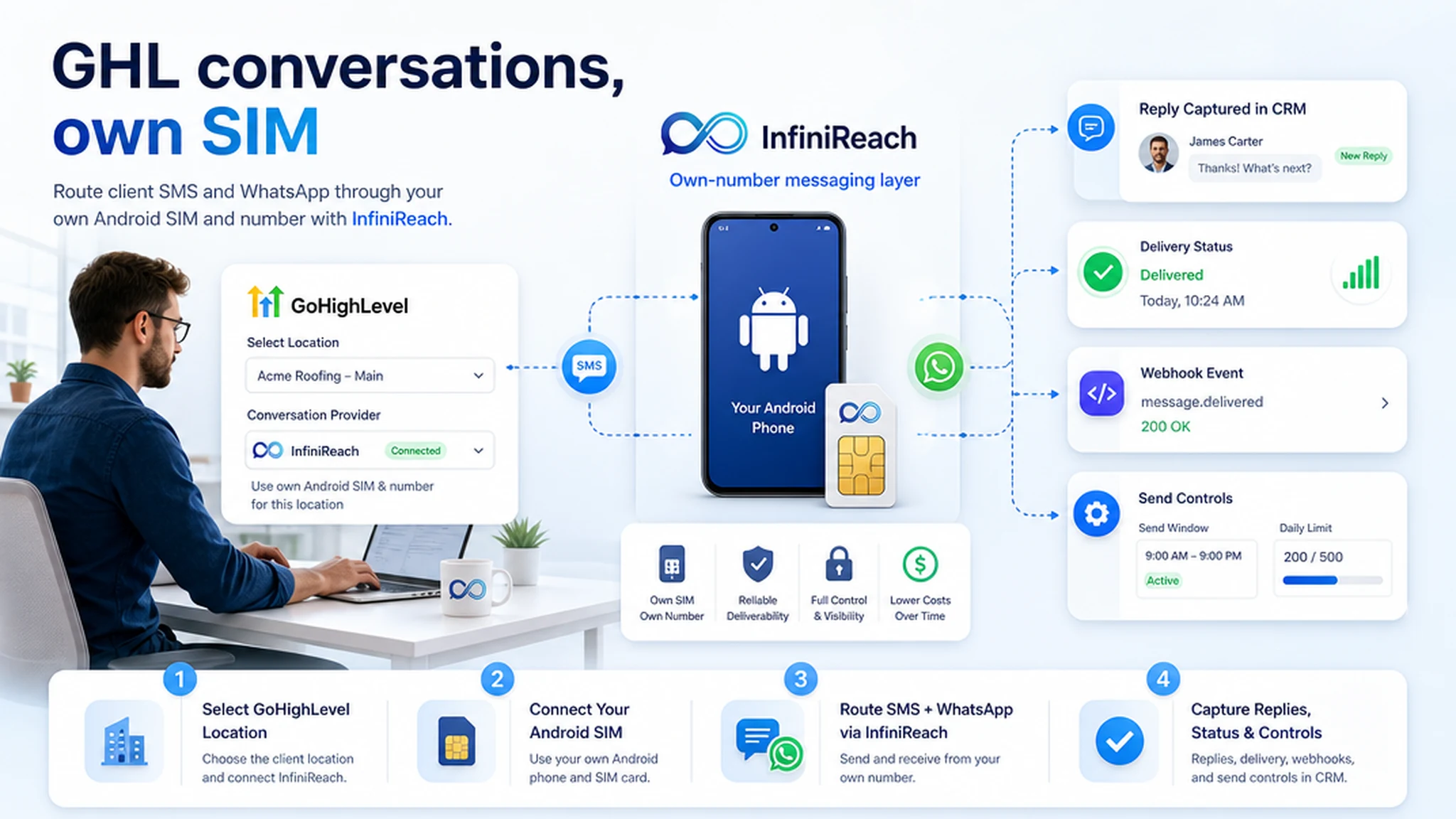
InfiniReach is built for agencies that want the GoHighLevel CRM layer without giving up sender ownership. GoHighLevel can keep contacts, opportunities, conversations, and workflow logic. InfiniReach handles the connected Android SIM, channel routing, inbound replies, delivery/status events, send windows, and daily SIM limits.
key takeaways
Use this page if you are choosing a GoHighLevel conversation provider and want to compare the default hosted SMS path with an own-SIM InfiniReach setup.
- InfiniReach can act as the messaging layer for GoHighLevel locations that need SMS from a client-owned Android SIM and number.
- The setup is strongest when replies, delivery status, sender identity, and client margin matter more than a generic send action.
- GoHighLevel keeps the CRM and workflow job; InfiniReach handles own-number SMS, WhatsApp routing, webhooks, and sender controls.
- Price one real workflow before scaling. Segment fees, carrier fees, inbound replies, and client volume can change the hosted SMS bill quickly.
why agencies search for conversation providers
Most agencies do not search for this because they want a glossary definition. They search because a subaccount needs SMS, the default path has usage fees, or a client wants messages to come from a familiar business number. The provider choice affects billing, reply handling, support load, and how cleanly conversations show up in GoHighLevel.
InfiniReach docs describe a GoHighLevel integration flow where an agency adds a location, authorizes the app, selects SMS Gateway as the conversation or telephony provider, links a device to the location, and sets routing. That is a different buying frame from “which SMS API is cheapest?” It is about whether the client location should be tied to a real sender the business controls.
where InfiniReach fits in the GoHighLevel stack
InfiniReach sits under GoHighLevel as the messaging transport and control layer. GoHighLevel still owns pipelines, triggers, calendars, contact records, staff tasks, and conversation views. InfiniReach owns the connected device path, the sender, the channel choice, the reply and status events, and the usage controls around each SIM.
That split is useful for agencies with many local clients. A dentist, roofer, gym, or med spa can keep a recognizable number. The agency still gets a workflow-friendly system instead of asking staff to send from a phone by hand.
- Android relay app for SMS through the client-owned SIM and number.
- Invite or QR-based registration for devices and WhatsApp paths.
- API sends with explicit `from` and `channel` control when a custom route needs it.
- Webhook events for replies and delivery status, so the CRM or automation can react.
- Send windows and daily SIM limits to keep sender usage deliberate.
conversation provider vs generic SMS API
A generic SMS API can send a message. A conversation provider decision has more moving parts because GoHighLevel users expect contacts, replies, message history, and workflow actions to stay tied to the subaccount. If the provider is only a one-way pipe, staff still have to solve replies somewhere else.
- Generic SMS API: good for direct developer sends, but it may not solve sender mapping, reply routing, or subaccount operations by itself.
- LC Phone or hosted CPaaS path: convenient when you want managed telecom infrastructure and accept usage-funded billing.
- Basic own-phone gateway: can lower raw sending exposure, but may lack WhatsApp, webhooks, agency routing, or send controls.
- InfiniReach: own-SIM SMS plus WhatsApp, GoHighLevel fit, reply/status webhooks, explicit sender/channel control, send windows, and daily SIM limits.
a quick cost check before you pick a provider
The provider choice should include a small monthly model. Existing GoHighLevel pricing notes in this repo cite HighLevel support materials listing US/Canada local numbers at $1.15 per month and SMS at $0.00747 per segment before carrier pass-through fees. The same notes cite carrier fees around $0.0035 to $0.0050 for many outbound SMS segments, depending on carrier. Public Twilio pricing lists US long-code SMS at $0.0083 outbound and $0.0083 inbound per segment, with other fees possible.
Example: a local-service agency sends 8,000 outbound one-segment reminders and gets 2,000 inbound replies across a client location. At the Twilio $0.0083 benchmark, that is 10,000 segments × $0.0083 = $83 before number rental, carrier fees, registration items, platform markup, or failed-message fees. At a HighLevel-style $0.00747 base plus a $0.0035 carrier fee on 8,000 outbound segments, the outbound portion alone is $87.76 before inbound replies and other items.
With InfiniReach, the question changes. What does the client phone plan plus InfiniReach software cost for that workflow, and is the value of the owned sender, reply path, WhatsApp routing, and operator controls worth moving it off the purely metered path? That is a cleaner agency-margin question than chasing one headline SMS rate.
a clean setup path for one GoHighLevel location
Start with one subaccount and one workflow. The goal is not to move every campaign on day one. The goal is to prove the full loop: outbound send, reply, delivery status, GoHighLevel conversation update, and staff handoff.
- Connect the client Android phone and SIM in InfiniReach using the invite or QR flow.
- Add the GoHighLevel location through the InfiniReach integration flow and authorize the app where required.
- Select the SMS Gateway or InfiniReach provider path in the GoHighLevel phone/conversation settings for that location.
- Link the device to the location, then set routing: SMS only, WhatsApp only, or SMS plus WhatsApp where the workflow needs it.
- Test one workflow, then add send windows and daily SIM limits before client volume grows.
best-fit workflows for this model
The best first workflows have a clear reply path and a clear business owner. If nobody will read or route replies, fix that before changing the provider.
- Missed-call text back from the same number a prospect just called.
- Lead follow-up when a new opportunity enters a GoHighLevel pipeline.
- Appointment reminders where confirmations and reschedules should reach staff.
- Review requests from a recognizable client number instead of a random sender.
- Reactivation lists where send windows and daily SIM limits keep volume controlled.
when not to use an own-SIM provider path
InfiniReach is not the right answer for every GoHighLevel account. Stay with a hosted CPaaS, LC Phone-style path, or a specialized telecom provider when you need managed global telecom coverage, high-throughput OTP, dedicated short codes, carrier-contract throughput, or a registration-heavy sender model handled for you.
Use InfiniReach when the workflow benefits from a number the client controls, predictable operator economics, SMS plus WhatsApp routing, and reply/status automation. Keep consent, local rules, and carrier-safe practices in the plan either way.
next step: map one location and one sender
Pick one GoHighLevel location. Write down the sender number, the first workflow, expected outbound segments, expected replies, and where staff should see the conversation. If that map points to own-number control, SMS plus WhatsApp, and webhook-driven replies, compare the hosted provider path with an Android SIM plus InfiniReach.
Start with pricing if you want to model the bill. Book a demo if you want to map the exact location, provider setting, device, and reply route before touching a live client workflow.