send SMS from your own number: the short answer
Most teams find this query after hitting the same wall: Twilio-style APIs and hosted SMS platforms can send messages, but the sender is usually a rented or registered number and every segment becomes a line item. That may be fine for one app. It gets harder for agencies, local businesses, and CRM operators who want the customer to recognize the number and reply normally.
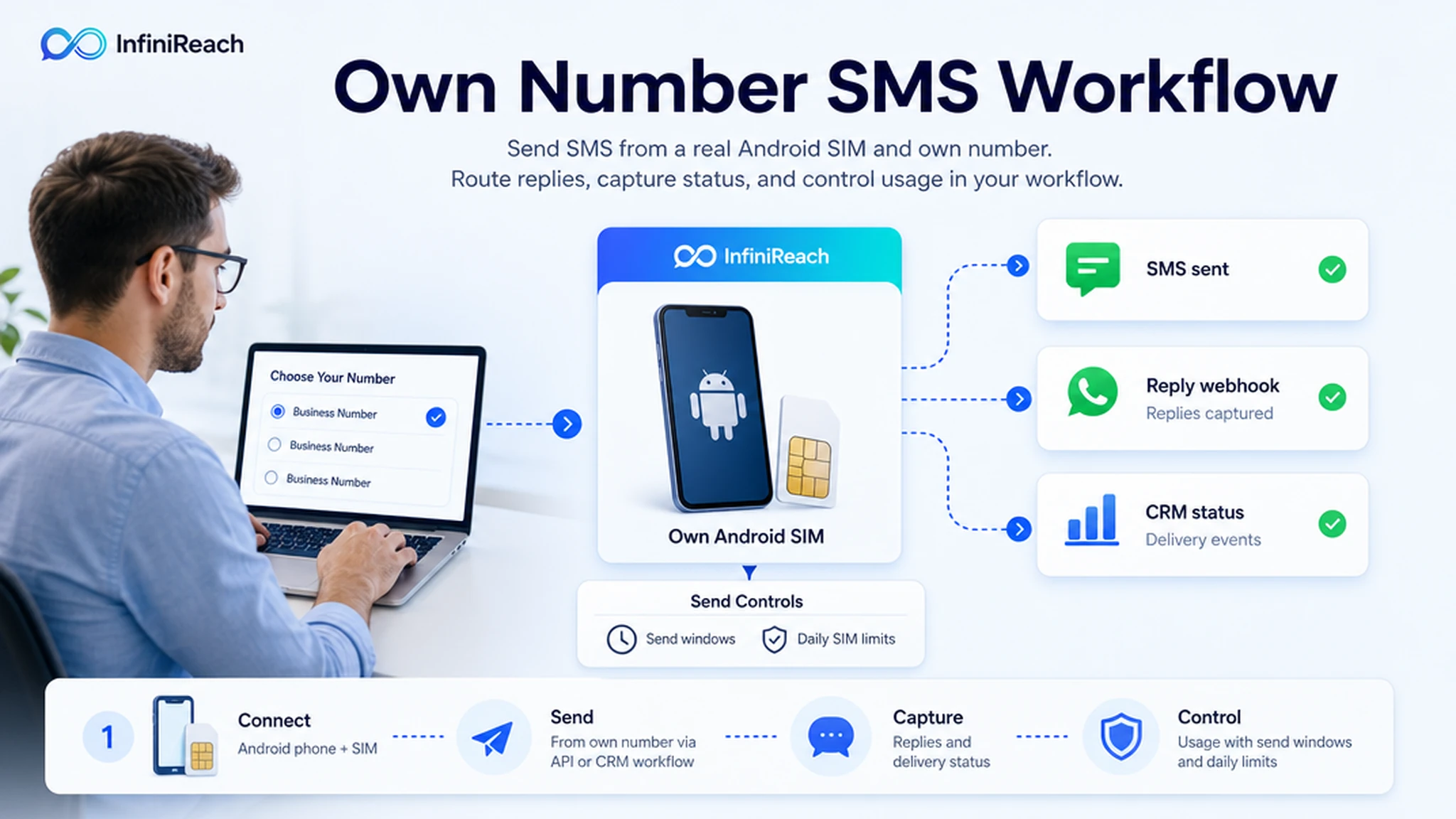
InfiniReach gives that workflow an own-number path. An Android phone and SIM become the SMS sender. InfiniReach adds the business layer around it: API sends, explicit sender and channel routing, two-way replies, delivery status events, send windows, daily SIM limits, and GoHighLevel-friendly automation.
key takeaways
Use this page if you want your CRM, script, or automation tool to send SMS from a number the business already controls.
- InfiniReach uses an Android relay app so SMS can go out through your own SIM and number.
- The API can choose the sender and channel with explicit `from` and `channel` fields.
- Replies and delivery status can return through webhooks instead of being trapped on a phone.
- Send windows and daily SIM limits help keep own-number sending operational, not reckless.
- This is strongest for business follow-up, client workflows, and agency accounts where sender identity matters.
why teams search for own-number SMS
The buyer is usually not asking what SMS is. They already have a workflow: a lead form, appointment reminder, missed-call text back, payment nudge, support update, or Google Sheet row. The real question is whether that workflow can send from the number customers already know.
Hosted APIs answer with virtual numbers, registration flows, per-segment pricing, and provider-owned sender management. Own-phone gateway tools answer with device relaying, but many stop at the hobby layer. InfiniReach sits between those options: the sender is still your Android SIM, but the workflow has CRM routing, webhooks, message history, and operator controls around it.
how InfiniReach sends from your own number
The setup starts with a real Android device. The device is registered to InfiniReach through the invite or QR flow, then the phone and SIM act as the SMS path for the business number. Current setup docs are Android-first for SMS relay, so do not plan this around an iPhone SMS relay.
From there, your app or automation tool calls InfiniReach instead of texting from the handset manually. A CRM workflow, Python app, n8n scenario, Make scenario, Zapier webhook, or GoHighLevel action can submit the recipient, message body, sender, and channel. InfiniReach sends through the selected route and records the result.
- Android relay app connects the real phone and SIM.
- Invite or QR registration keeps device onboarding practical for teams and clients.
- `POST /api/v1/messages` style sends let developers and automation tools trigger messages.
- `from` and `channel` control which sender and path should be used.
- Webhook events can send replies and delivery status back to your workflow.
a simple cost check before you choose a sender
Public Twilio US SMS pricing lists $0.0083 to send and $0.0083 to receive a local SMS segment. Twilio also lists a $0.001 processing fee for failed-message attempts on US long code SMS. Those numbers are small one by one, but they turn into a usage bill when a CRM sends reminders every day.
Example: 12,000 outbound segments and 2,000 inbound reply segments in a month would be 14,000 billable SMS segments. At $0.0083 per segment, the raw SMS line is $116.20 before other number, carrier, registration, or software costs. With InfiniReach, the comparison is different: price the phone plan, the Android device/SIM you control, and the InfiniReach software plan needed for that workflow.
That does not make own-SIM sending magic or unlimited. Your carrier plan, consent rules, send windows, and daily SIM limits still matter. The value is that the marginal platform fee does not grow the same way every time a workflow sends another segment.
compare the common ways to send from a business number
The right path depends on who owns the sender and where replies need to land. Here is the practical operator comparison.
- Twilio or hosted CPaaS: strong developer APIs, but sender setup, A2P/10DLC registration, carrier fees, and per-segment pricing stay part of the operating model.
- Simple phone gateway: the message may come from your SIM, but reply handling, CRM sync, limits, audit history, and multi-client operations can be thin.
- Manual phone texting: familiar sender, but no clean API, no automation trail, and no scalable way to route replies back to the team.
- InfiniReach: own Android SIM sending plus API routing, replies/status webhooks, SMS + WhatsApp coverage where relevant, and controls for agency or business workflows.
workflows that fit own-number SMS
Own-number SMS works best when the recipient should recognize the sender and a reply should matter. Start with one workflow that has consent, a clear business reason, and a known owner for replies.
- Missed-call text back from a local business number, with replies assigned to the right person.
- GoHighLevel lead follow-up where each client location keeps its own sender.
- Appointment reminders that branch when a customer confirms, cancels, or asks a question.
- Payment or quote follow-up from a sales number the customer already has saved.
- Internal alerts where delivery status and audit history need to be visible outside the phone.
when not to use InfiniReach for this
Do not use an own-SIM path when you need a hosted global CPaaS footprint, short codes, toll-free verification, carrier-managed high-volume programs, or OTP infrastructure across many countries. A provider like Twilio can be the right answer for those cases, especially when the sender model and compliance program are already built around hosted messaging.
InfiniReach is a better fit when the business already has a real number, wants replies in the CRM, cares about recurring message economics, and is willing to operate a connected Android sender responsibly. You still need consent, clean lists, responsible frequency, and local rule checks.
go-live checklist for own-number sending
Before moving a workflow from test to production, check the parts that usually break first: sender mapping, consent, replies, volume, and after-hours behavior.
- Confirm which business number or SIM should send each workflow.
- Set send windows so reminders and follow-ups do not fire at the wrong time.
- Set daily SIM limits that match the carrier plan and business use case.
- Route replies and status events to a CRM, helpdesk, or human owner.
- Test opt-out handling and consent language before importing a list.
- Keep SMS and WhatsApp routing explicit when a workflow uses both channels.
next step: price one real workflow
Pick one workflow you already run today. Count the monthly outbound segments, expected replies, sender numbers, and users who need visibility. Then compare the hosted SMS usage bill against an own Android SIM, your phone plan, and the InfiniReach plan that covers the workflow.
If the workflow needs a recognizable sender, two-way replies, API control, and predictable operator economics, start with InfiniReach pricing or book a demo to map the sender and webhook path before you migrate the rest of the account.