google sheets WhatsApp integration: the short answer
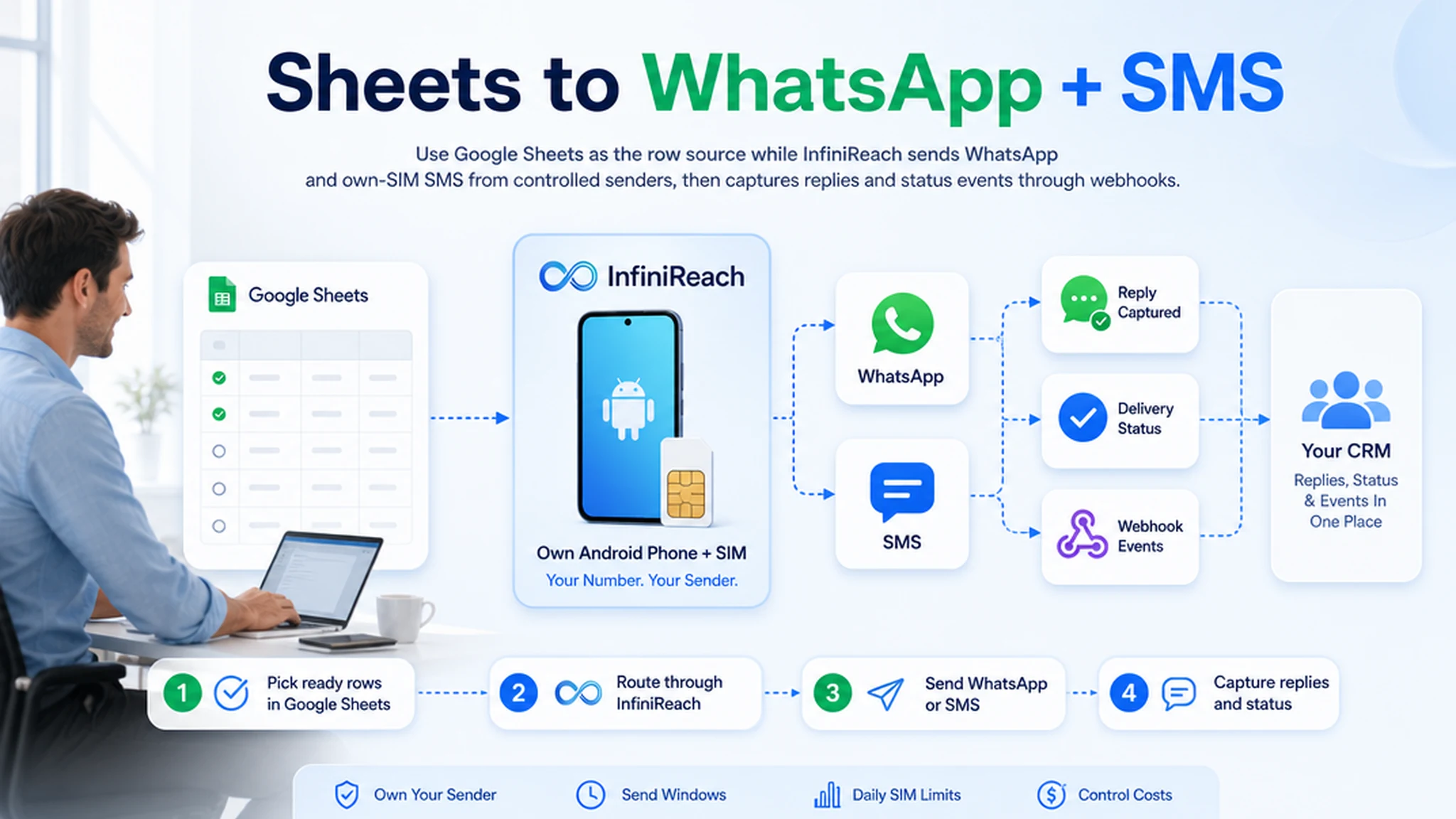
Most Google Sheets WhatsApp tutorials solve the first send: take a row, call an API, and push a WhatsApp message. The harder question is what happens after that message is sent. Who owns the sender? Where do replies land? What happens when a customer cannot be reached on WhatsApp?
InfiniReach sits behind the sheet as the messaging layer. Google Sheets keeps the row data. Your automation tool or Apps Script calls InfiniReach with the recipient, message, sender, and channel. InfiniReach handles own-number WhatsApp, own-SIM SMS fallback where it fits, replies, delivery status, webhooks, send windows, and daily SIM limits.
key takeaways
Use this setup when Google Sheets is the list, but the conversation still needs a real sender, a reply path, and channel control.
- Send WhatsApp from Google Sheets without turning the sheet into a one-way blast tool.
- Use InfiniReach API fields such as `from` and `channel` so the workflow chooses the sender and route on purpose.
- Keep SMS fallback available through your own Android phone and SIM when WhatsApp is not the right path.
- Route replies and delivery status back into a CRM, helpdesk, or automation workflow through webhooks.
- Use send windows and daily SIM limits so imported rows do not create uncontrolled message volume.
why teams search for Google Sheets WhatsApp integration
The buyer usually has a practical sheet: new leads from a form, appointment rows, invoice nudges, pickup updates, renewal lists, or a small campaign that does not yet belong in a full CRM. They want the row to trigger a WhatsApp message without copying numbers by hand.
The common options are add-ons, WhatsApp Business Cloud tutorials, Zapier or Make recipes, and Apps Script examples. Those can be enough for a test. They often leave out sender ownership, reply routing, SMS fallback, and operator limits. That is the gap InfiniReach is built to cover.
where InfiniReach fits in the spreadsheet workflow
Think of the sheet as the source of rows, not the messaging system. A script or automation tool watches for rows marked “ready,” then sends an API request to InfiniReach. InfiniReach sends the message through the chosen WhatsApp path or SMS sender and returns events when the customer replies or the message status changes.
That split keeps the sheet simple. Operators can still audit the rows, but messaging rules live in the system that understands senders, channels, webhooks, and limits.
- Google Sheets row: recipient, message, timing, campaign, and sender choice.
- Automation step: Apps Script, Zapier, Make, n8n, or another HTTP-capable tool calls InfiniReach.
- InfiniReach send: explicit `from` and `channel` fields choose WhatsApp or SMS.
- Webhook return path: replies and status events go back to the CRM or workflow.
compare the common setup options
A WhatsApp add-on can be quick. A direct Meta or CPaaS tutorial can be useful for developers. InfiniReach is the better fit when the sheet is part of a repeatable customer workflow and the team cares about sender identity, replies, and fallback.
- Spreadsheet add-on: fast for a one-off send, but the sender, reply path, and pricing model usually belong to the add-on provider.
- WhatsApp-only API: good when every contact is WhatsApp-ready, but weak when some rows need SMS fallback or a known business number.
- Twilio or broad CPaaS path: strong for hosted infrastructure, but each message still sits inside a metered provider model and may require sender setup or approval steps.
- InfiniReach: Sheets triggers the workflow while InfiniReach handles own-number WhatsApp, own-SIM SMS, reply/status webhooks, and operator controls.
spreadsheet workflows that fit this setup
Start with a workflow where a reply changes the next step. If nobody will read replies, fix that before sending from a sheet.
- Lead follow-up: a new row from a form sends a WhatsApp message, then an SMS fallback if the workflow calls for it.
- Appointment reminders: Sheets stores the schedule, InfiniReach sends the message, and replies route to staff.
- Invoice or quote follow-up: one approved row sends a polite reminder from the number the customer already knows.
- Pickup or delivery updates: operations teams can trigger updates from a shared sheet without giving up message history.
- Agency client lists: each client can keep a deliberate sender map instead of mixing numbers across accounts.
a quick cost check for SMS fallback rows
WhatsApp may be the first channel, but spreadsheet workflows often need SMS fallback for rows that do not reply or cannot use WhatsApp. That is where metered SMS costs become visible.
Twilio publicly lists US long-code SMS at $0.0083 to send and $0.0083 to receive, plus a $0.001 failed-message processing fee. If 10,000 sheet-triggered fallback segments run through that model, the segment line alone is about $83 before number, carrier, and registration-related costs. With InfiniReach, the fallback test is different: price the phone plan, the SIM, and the InfiniReach software for the sender you control.
controls that matter before rows go live
Sheets are easy to duplicate, sort, import, and break. That is why production messaging needs guardrails outside the spreadsheet.
InfiniReach gives operators practical controls such as send windows and daily SIM limits. Those controls help stop a bad import, wrong filter, or after-hours automation from turning into a batch nobody meant to send.
- Choose the sender explicitly instead of hiding sender logic inside one script.
- Keep WhatsApp and SMS routing visible at the row or workflow level.
- Send replies and delivery status to a real inbox, CRM, or automation path.
- Set limits before the workflow moves from a test sheet to a client list.
when a direct WhatsApp or CPaaS route is better
Use a direct WhatsApp Business Cloud or CPaaS setup if you need a pure hosted-provider model, global OTP delivery, short-code programs, or a team that already has sender registration, templates, and compliance operations handled elsewhere.
InfiniReach is the better fit when the spreadsheet workflow needs own-number control, SMS plus WhatsApp routing, two-way replies, and practical operator economics. It is not a shortcut around consent, local rules, or responsible messaging.
next step: map one sheet row to one message
Pick one real sheet with permissioned contacts. Add columns for recipient, message, channel, sender, status, and owner. Then map how the API call sends the message and where replies should land.
If that map needs your own number, SMS fallback, and webhook replies, price that one workflow in InfiniReach before you rebuild the whole spreadsheet process.