android SMS gateway with WhatsApp: the short answer
Most Android SMS gateway tools solve one job: send or receive SMS through a phone. That is useful, but agency messaging rarely stays SMS-only. Leads answer on WhatsApp, clients expect replies to land in the CRM, and campaign operators need sender controls before volume grows.
InfiniReach adds the operating layer around the phone. The Android device and SIM handle own-number SMS. InfiniReach adds WhatsApp routing, API sender and channel control, webhook replies and status events, message history, send windows, and daily SIM limits.
key takeaways
Use this page if you like the Android gateway model but need SMS and WhatsApp to work together for real client workflows.
- InfiniReach can send SMS through your connected Android phone, SIM, and own number where that setup fits your consent and carrier rules.
- The same stack can support WhatsApp workflows, so agencies do not have to split SMS and WhatsApp across unrelated tools.
- API calls can pass explicit from and channel fields, which keeps sender and channel choices visible in automation logic.
- Webhook events can send replies and delivery status back to GoHighLevel, n8n, Zapier, Make, Sheets, or a custom backend.
- Send windows and daily SIM limits help keep automated sends under operator control.
why buyers search for Android SMS plus WhatsApp
The buyer usually already understands the basic Android gateway pitch. They have seen tools such as textbee, SimGate, SMSMobileAPI, SMSGate, or GitHub Android gateway projects. Those tools prove there is demand for phone-based sending, API calls, inbound webhooks, and lower exposure to per-SMS provider fees.
The harder decision is what happens after the first SMS works. A local agency may need missed-call text back from the client number, WhatsApp follow-up for warmer leads, SMS fallback when WhatsApp is not the right channel, and a reply path that updates the CRM instead of trapping conversations on a phone or standalone dashboard.
where InfiniReach fits in the stack
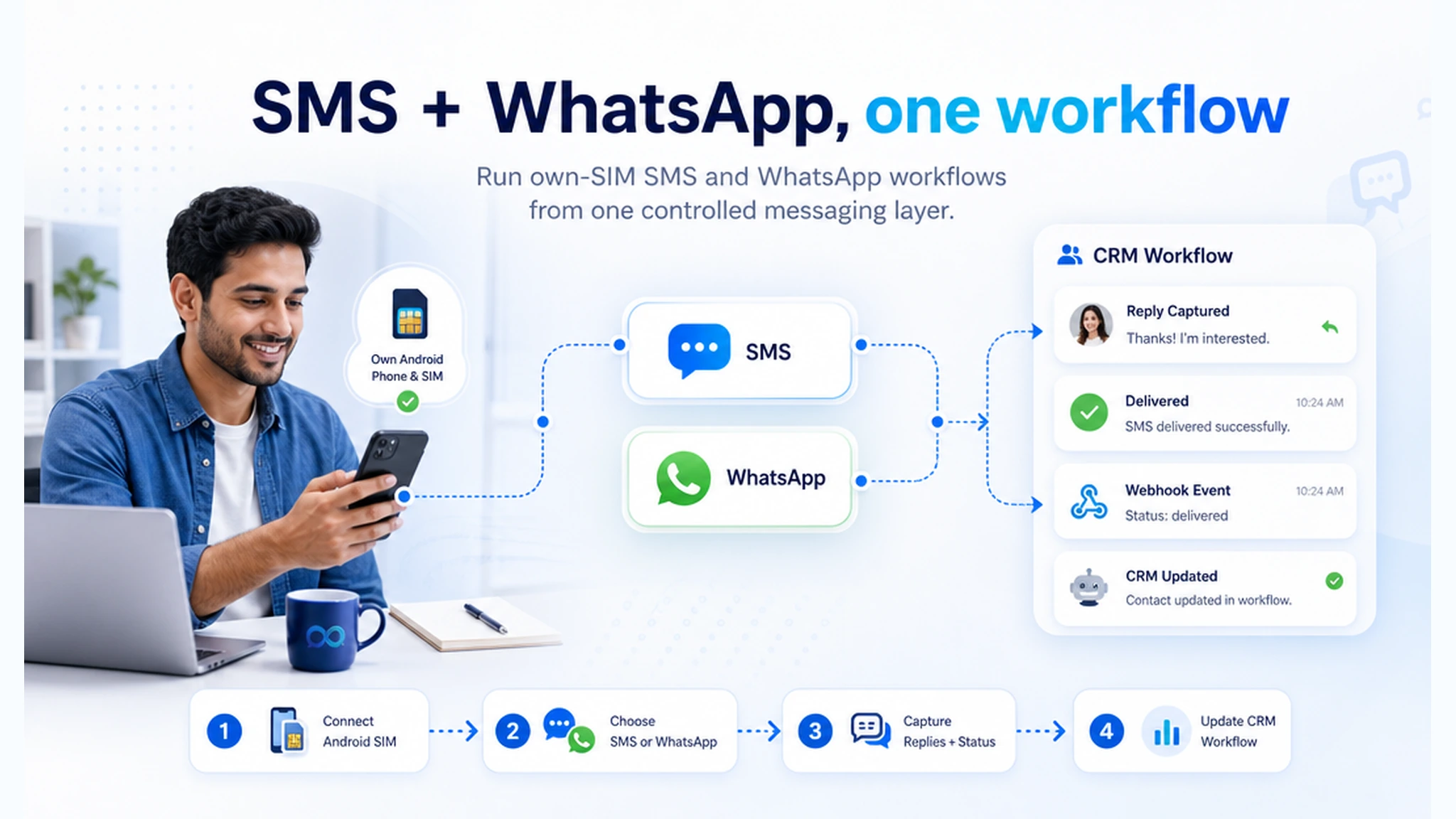
InfiniReach sits between your CRM or automation tool and the real sender. The CRM decides who should get a message and why. InfiniReach receives the request, chooses the sender and channel you specify, routes the message through the connected Android SIM or WhatsApp path, then records what happened.
That split is important. The Android phone is the transport for own-SIM SMS, not the whole operating system. InfiniReach is the layer that makes the gateway useful for client accounts, replies, status events, channel routing, campaign work, and day-to-day support.
- Android relay app for SMS through a real connected phone and SIM.
- Invite or QR-style onboarding for connected devices and WhatsApp paths.
- POST /api/v1/messages style sending with explicit from and channel control.
- Webhook replies and status events for CRM or automation follow-up.
- Send windows and daily SIM limits for safer production workflows.
compare basic Android gateways with InfiniReach
A lightweight Android gateway can be enough when a developer only needs a private SMS endpoint. It is less comfortable when an agency has to support clients, prove reply handling, route across SMS and WhatsApp, and keep each sender tied to the right business.
- Basic Android SMS gateway: usually strong for direct REST sending and simple inbound webhooks, but often SMS-only and developer-operated.
- WhatsApp-only API tool: useful for WhatsApp campaigns or automation, but it does not solve own-SIM SMS fallback or real-number SMS economics.
- Hardware or SIM box gateway: offers SIM control, but adds appliance setup, ports, networking, heat, firmware, and office-hardware concerns.
- InfiniReach: keeps the Android own-SIM sender while adding SMS plus WhatsApp, CRM-ready webhooks, agency workflow routing, and operator limits.
workflows that need both channels
The strongest use cases are not generic broadcasts. They are small loops where a contact can reply and the team has to act on that reply.
- New lead follow-up: send SMS from the client number first, then route WhatsApp when the workflow calls for it.
- Appointment reminders: capture confirmation, reschedule requests, or “wrong number” replies back into the CRM.
- Missed-call text back: answer missed calls with a same-number SMS, then continue the thread or move to WhatsApp.
- Reactivation campaigns: keep each client tied to its sender, send window, and daily volume plan.
- Internal alerts: use SMS for urgent local reach and WhatsApp for international or channel-specific workflows.
a practical setup path
Start with one phone, one SIM, and one workflow. Register the Android device in InfiniReach, send a test SMS from the chosen number, then test a WhatsApp path if that channel belongs in the same customer journey.
After the outbound test, prove the loop that most teams skip: a reply comes in, a webhook fires, the CRM updates, and a human can see the conversation. Only then should you add more senders, more clients, or higher daily limits.
- Connect the Android phone and SIM for SMS relay.
- Create a send request from GoHighLevel, n8n, Zapier, Make, Sheets, or your backend.
- Pass the selected from number and channel in the API call.
- Route replies and message status to a webhook endpoint.
- Add send windows and daily SIM limits before client volume starts.
controls to add before real volume
Own-SIM sending is still business messaging. It needs consent, sender discipline, and local rules. Do not frame Android SMS as a compliance shortcut. Frame it as a way to keep sender ownership while giving the operator more control over how messages go out.
For agencies, the biggest control risk is mixing senders. A reminder for one client should not leave from another client’s SIM. A late-night workflow should not fire because a spreadsheet changed. InfiniReach gives operators places to manage those details before workflows run unattended.
- Keep each sender tied to the right brand, location, or client account.
- Use send windows for local business hours and sensitive follow-up.
- Use daily SIM limits so one sender does not carry more volume than planned.
- Make inbound replies visible to a CRM, workflow, inbox, or human owner.
when a traditional provider may still win
InfiniReach is not the right answer for every messaging program. If you need short-code programs, carrier-grade global routes, high-volume OTP infrastructure, or a formal enterprise CPaaS procurement path, a traditional provider may fit better.
InfiniReach is the better fit when the job is client or business messaging from numbers you control: lead follow-up, reminders, support, missed-call text back, CRM workflows, and agency operations where SMS plus WhatsApp and reply handling matter as much as raw send volume.
next step: test one sender and one reply loop
Pick a workflow that already has permissioned contacts and a clear owner. Connect the Android phone and SIM, send from the real number, test WhatsApp only where it belongs, then route replies and status events back to the system your team uses every day.
If that live loop needs own-number SMS, WhatsApp routing, webhook replies, and predictable software costs, InfiniReach is the operating layer to test before you wire every client workflow to a metered SMS-only stack.