A2P 10DLC registration challenges: the short answer

A2P 10DLC is the carrier framework used for many US business texts sent through hosted long-code providers. It can be the right route for high-scale, provider-managed, registered messaging. It can also slow down smaller agency workflows when brand checks, campaign review, rejected use cases, and per-segment billing hit before a client has even proven the campaign.
InfiniReach is not a compliance shortcut and it does not remove consent, carrier, or local-law duties. The difference is operational: for suitable own-number workflows, an agency can connect an Android phone and SIM, send from that owned sender, route replies/status into GoHighLevel or another CRM, and control usage with send windows and daily SIM limits.
key takeaways
Use this page to decide whether a delayed A2P workflow should stay on hosted 10DLC, move to an own-SIM sender path, or be split by use case.
- A2P review can create real launch friction: brand setup, campaign vetting, rejected copy, sender approval, and ongoing usage pricing.
- Twilio publicly lists US long-code SMS at $0.0083 outbound and $0.0083 inbound per segment, before any separate carrier, number, or compliance charges that may apply.
- InfiniReach starts at $37/month for paid plans and is built around connected devices rather than per-message platform fees, so teams can model software plus phone plan costs before scaling.
- Own-SIM sending still needs permissioned contacts, responsible volumes, opt-out handling, and carrier-safe use. It is an operating path, not a way to ignore rules.
why A2P review stalls ordinary CRM workflows
The pain usually shows up in small operational moments. A client wants appointment reminders live this week. A sales team wants missed-call follow-up from the business number. An agency wants to test a reactivation flow for one location before rolling it out to ten locations. Hosted A2P can require the team to describe the business, campaign purpose, opt-in path, sample copy, and sender setup before the first real workflow runs.
That process is not pointless. It exists because carriers are trying to separate permissioned business messaging from spam. The issue for operators is that the same process can be too heavy for a low-volume, known-customer workflow that simply needs replies and delivery status inside the CRM.
What should buyers ask before changing SMS paths?
The useful question is not “how do we avoid A2P?” The useful question is “which sender path fits this workflow, contact source, volume, geography, and risk profile?” A hosted A2P route may be the best fit for national volume, OTP, short-code programs, or enterprise compliance operations. An own-SIM path can be a better fit for local client workflows, reply-led follow-up, and agency operations where the sender number already belongs to the business.
Before changing paths, list the sender, the opt-in source, expected daily volume, reply owner, after-hours behavior, and fallback channel. If those fields are fuzzy, a new provider will not fix the workflow.
- Who owns the number customers recognize?
- Will the workflow need inbound replies, or only outbound sends?
- Can the sender safely handle the daily volume without blasting?
- Does the team need SMS only, or SMS plus WhatsApp routing?
How does per-segment pricing change the decision?

Twilio lists US long-code SMS pricing at $0.0083 to send and $0.0083 to receive per segment. That looks small until every reminder, reply, failed follow-up, and client location becomes a line item. For an agency sending 18,000 outbound segments and receiving 3,000 inbound segments in a month, the raw Twilio SMS segment math is about $174.30 before phone numbers, carrier fees, registration-related costs, or operational overhead.
With InfiniReach, the budget model starts from the device and software plan. The public Starter plan is $37/month, with higher plans for more devices and workspaces. You still need a phone, SIM, carrier plan, consent, and sensible limits, but the platform is designed so the software charge does not rise with every SMS segment.
- 18,000 outbound × $0.0083 = $149.40 in outbound SMS segment charges.
- 3,000 inbound × $0.0083 = $24.90 in inbound SMS segment charges.
- Raw segment total: $174.30 before other provider, number, carrier, registration, or support costs.
- Own-SIM comparison: phone plan + device + InfiniReach software, with send controls at the sender layer.
where InfiniReach fits beside hosted A2P SMS
InfiniReach sits between the CRM or automation tool and the real messaging sender. For SMS, that sender is an Android phone and SIM. The workflow can call InfiniReach through the API, choose the sender and channel, and receive replies or status events through webhooks. GoHighLevel teams can also use the native conversation-provider path when that is the right fit.
This matters because most A2P discussions stop at approval. Operators still need sender ownership, reply routing, delivery tracking, and limits after approval. InfiniReach is aimed at that operating layer.
- Android SMS/MMS relay through an owned SIM and business number.
- Explicit API `from` and `channel` routing for workflow control.
- Webhook replies and delivery/status events for CRM updates.
- Send windows and daily SIM limits so one workflow does not overload a sender.
How does an own-SIM setup work in practice?
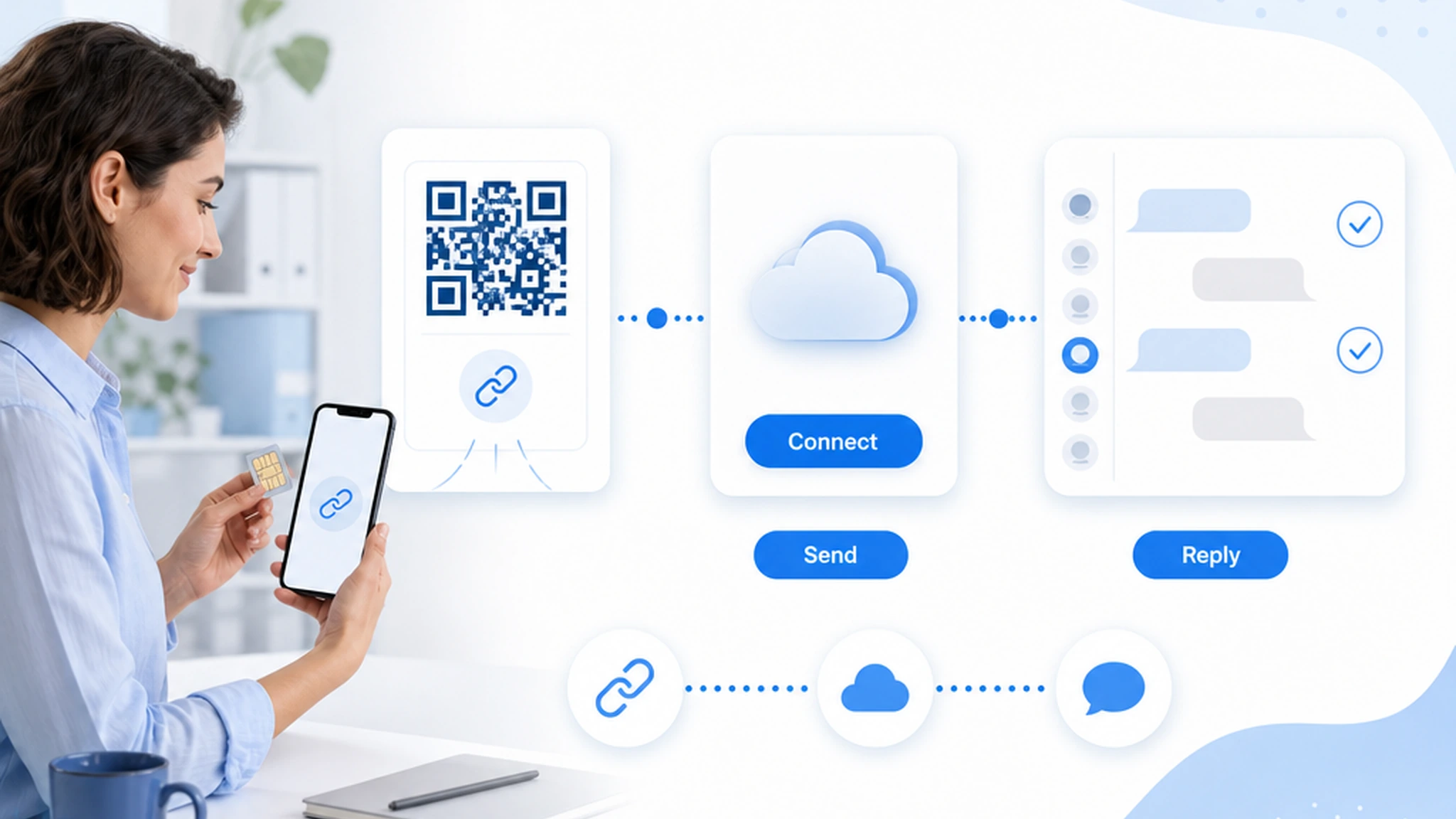
A practical setup starts with one real sender, not a fleet. The operator connects an Android device through the invite or QR flow, confirms the SIM and number, then maps one workflow that has permissioned contacts and a clear business purpose. After that, the CRM or automation tool sends requests through InfiniReach instead of sending directly through a metered hosted SMS API.
Replies and status events should be tested before volume increases. If the CRM cannot see a reply, pause a campaign, or notify a human, the workflow is not ready. That is true for hosted A2P and own-SIM paths alike.
comparison checklist: hosted A2P vs own-SIM path
There is no universal winner. The better path depends on the workflow. Use the comparison below to keep the decision concrete instead of ideological.
- Sender ownership: hosted A2P often uses provider-managed sender setup; InfiniReach can send through a business-owned Android SIM and number where that path fits.
- Launch friction: A2P may involve brand and campaign review; InfiniReach starts with connecting a device and sender, while still requiring consent and responsible use.
- Cost model: hosted APIs meter segments and may add number, carrier, and compliance fees; InfiniReach is fixed-cost friendly because software pricing is plan/device based.
- Replies: basic outbound setups can leave replies disconnected; InfiniReach is built around webhook replies, delivery status, and CRM conversation routing.
- Controls: hosted providers offer platform controls; InfiniReach adds sender-level send windows and daily SIM limits for own-device operations.
Why GoHighLevel agencies feel the A2P pain first
GoHighLevel agencies often sell the workflow before the messaging infrastructure is settled. A client wants lead follow-up, missed-call text-back, appointment reminders, or reactivation messages, and the agency needs to price the service, set expectations, and show a result. A2P review can turn that first proof into a waiting game.
InfiniReach helps agencies separate the workflow from the carrier paperwork question. For suitable clients, the agency can connect the client-owned sender, route messages into HighLevel conversations, and use webhooks/status events to keep automation visible. For clients that need hosted A2P, short codes, or regulated volume, the agency can keep that path instead.
Does an own-SIM path remove compliance work?
No. Consent, opt-out handling, local rules, carrier acceptable-use policies, and customer expectations still matter. InfiniReach should be positioned as another operating path for suitable own-number workflows, not as a promise that all compliance work disappears.
That honest framing is useful in sales conversations. It keeps agencies from overselling “no A2P” as “no rules.” The value is practical control: a real sender, known workflow, reply handling, status events, and limits that the operator can understand.
when not to use InfiniReach for A2P friction
Do not use InfiniReach as the primary path for every SMS job. If the use case needs enterprise short-code throughput, global OTP, bank-grade verification, provider-managed compliance procurement, or a centrally approved hosted sender strategy, a CPaaS or specialist provider may be the right tool. If a legal or compliance team requires A2P registration for the campaign, follow that requirement.
InfiniReach is strongest when the workflow is business-owned, reply-aware, CRM-connected, and suited to an owned phone number. Local service businesses, agencies, appointment-driven teams, and operator-led follow-up flows are better fits than anonymous bulk blasts.
controls that make own-SIM messaging safer to operate
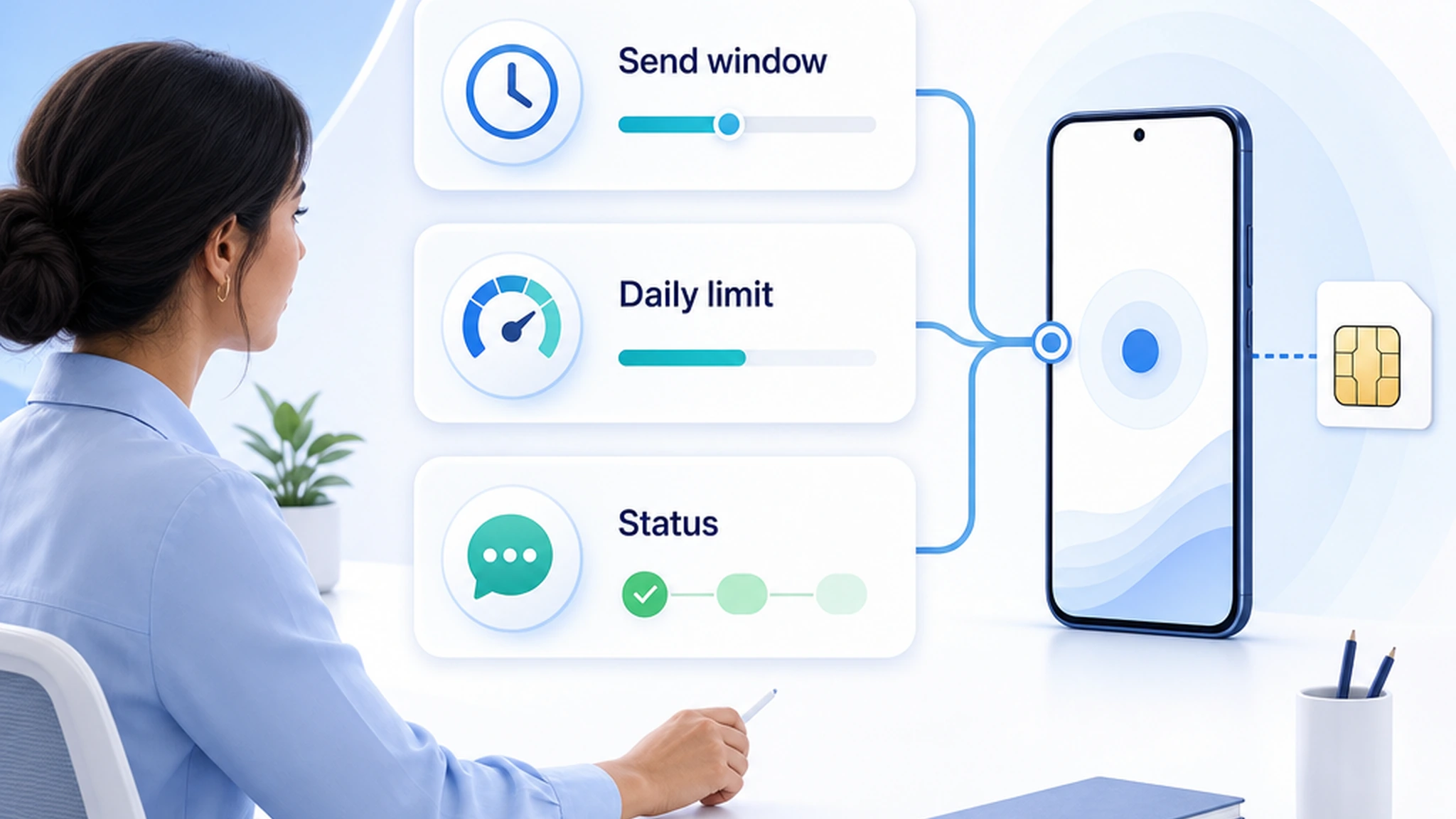
The sender path is only half the system. Controls decide whether a campaign behaves like a business workflow or an accidental blast. InfiniReach supports send windows so messages do not fire after hours, daily SIM limits so a single sender is not overloaded, and status/reply events so the CRM can react when a message fails or a customer answers.
Those controls are especially important for agencies. A client import, duplicate workflow, or bad automation branch can create risk quickly. Limits and webhook visibility give the operator a chance to pause, reroute, or hand off before the customer experience breaks.
a practical setup path before replacing an A2P workflow
Start with one workflow and one sender. Pick a client or internal use case where contacts are permissioned, replies matter, and volume is small enough to observe. Connect the Android phone and SIM, map the sender in InfiniReach, and test the API call or GoHighLevel route end to end.
Only expand after four checks pass: the message sends from the expected number, the reply lands where the team works, the delivery status is visible, and send limits are configured. If any of those fail, fix the workflow before adding more contacts or locations.
- Choose one permissioned workflow: reminders, missed-call follow-up, quote follow-up, or reactivation.
- Connect the Android sender through invite or QR onboarding.
- Send through API `from` and `channel` fields or the appropriate CRM route.
- Confirm replies, delivery status, opt-out handling, send windows, and daily SIM limits.
How should agencies decide between waiting and moving?
If a campaign is already approved, high-volume, and working on A2P, there may be no reason to move it. If the workflow is delayed, local, reply-led, and tied to a number the client already owns, test an own-SIM route before losing another launch window.
The best decision is usually split, not all-or-nothing. Keep provider-managed A2P where it fits. Use InfiniReach where the business needs sender ownership, CRM replies, SMS plus WhatsApp routing, and a fixed-cost friendly operating model.
next step: price one delayed SMS workflow
Take one delayed A2P workflow and write down the real numbers: expected outbound segments, expected inbound replies, sender count, phone plan cost, software plan, launch deadline, and who owns replies. Then compare hosted A2P against an InfiniReach own-SIM path for that exact workflow.
If the workflow needs own-number sending, reply capture, and CRM status events more than it needs a hosted A2P sender, map it in InfiniReach and test it with a small permissioned list before scaling.