Google Sheets WhatsApp reply webhooks: the short answer
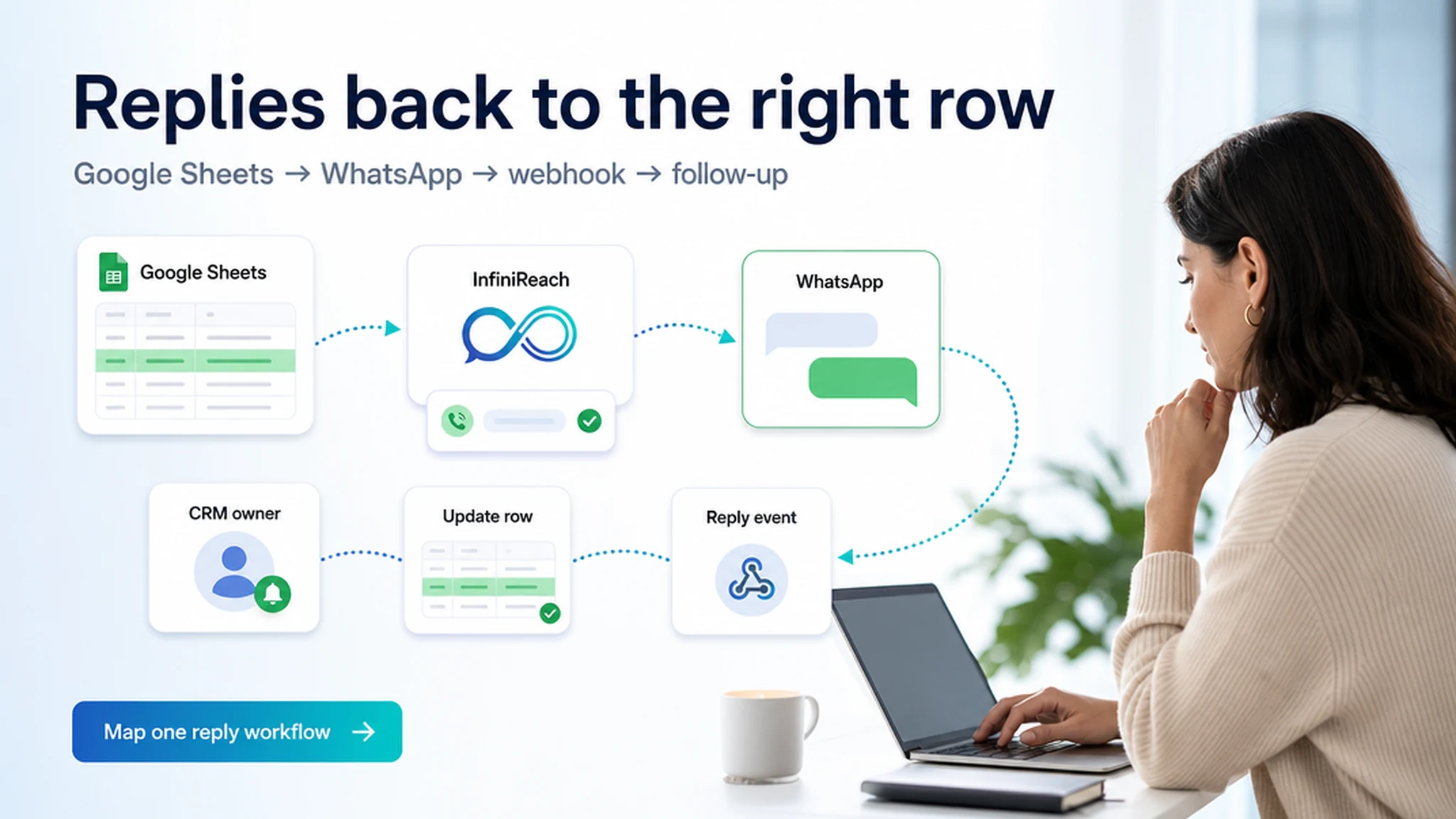
A spreadsheet-triggered WhatsApp message is only useful if someone can see the answer. InfiniReach connects a messaging number you control, sends with an explicit API sender and channel, then posts inbound-message and status events to your webhook endpoint.
Your endpoint can write the sender, reply, time, and event type into Google Sheets through Apps Script or an automation platform. It can also update a CRM, pause a follow-up, or alert a person. The sheet stays the list; the webhook carries the conversation back.
key takeaways
Build the return path before you send a large list. A reply should change a record or reach a person, not disappear into an unmonitored inbox.
- InfiniReach supports WhatsApp inbound and status webhook events for connected messaging workflows.
- The API requires `from` and `channel`, so the sender and route are explicit.
- A webhook receiver or automation step can map the incoming sender and message to a sheet row.
- Use an Android phone and SIM for SMS fallback; WhatsApp is a separate connected route.
- Twilio lists US SMS at $0.0083 per segment each way, before carrier fees and other charges.
what are buyers trying to track in Sheets?
Most teams already have a row for each lead, booking, quote, or service request. They want to add WhatsApp without creating a second inbox that staff must check by hand. Then a reply needs to mark the row, notify an owner, or stop the next reminder.
Zapier’s Google Sheets and Twilio listings show the two-way pattern: log an incoming WhatsApp message, then update a spreadsheet row. Apps Script and webhook tutorials show another route. The buying decision is less about sending one message and more about who owns the sender, how a reply is matched, and where the team works the conversation.
where the webhook fits in the workflow
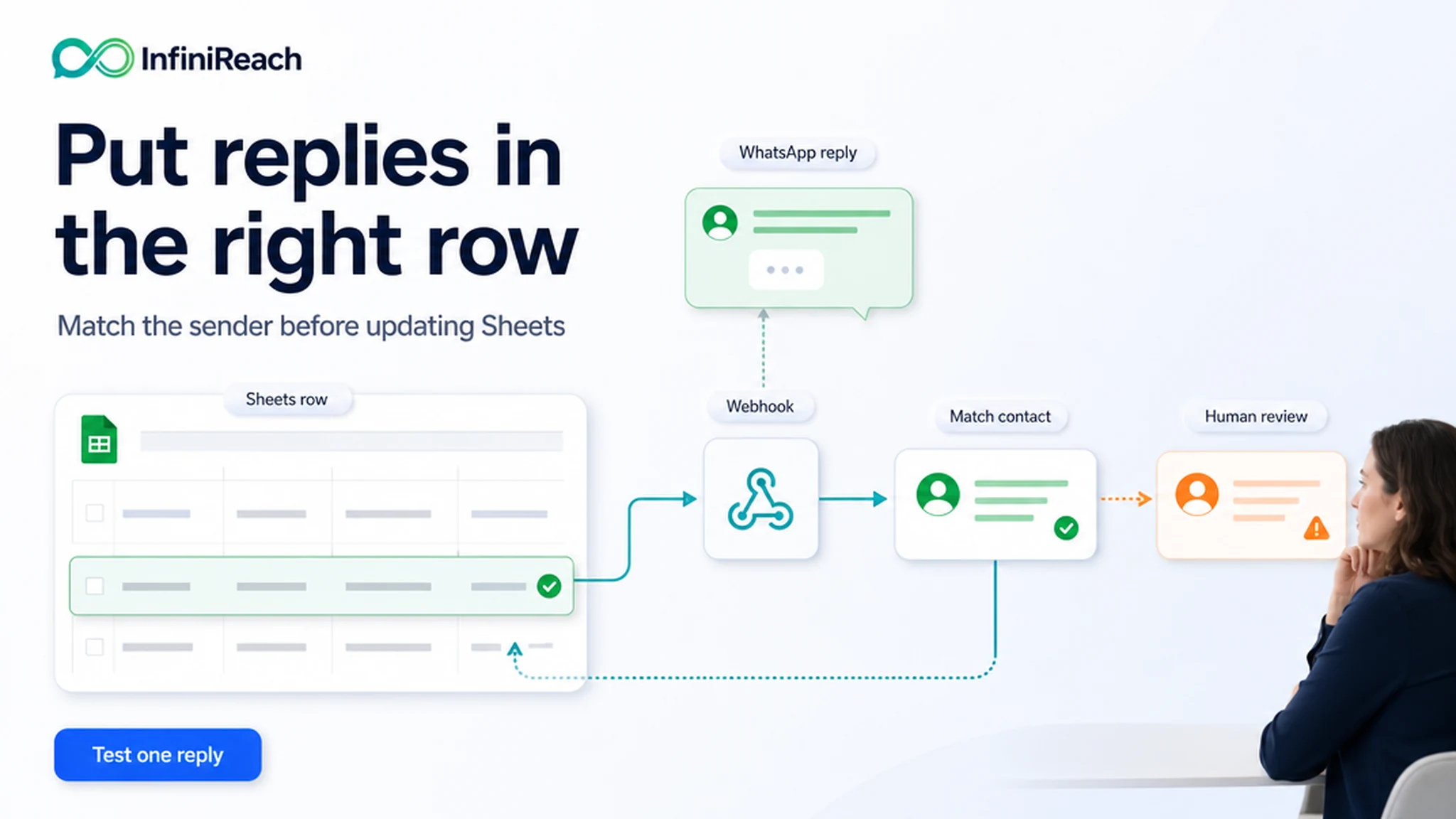
A clean design has an outbound path and a return path. Google Sheets or its automation starts the send. InfiniReach sends through the selected connected route. When a customer replies, InfiniReach posts the inbound event to the webhook you configured. Your receiver then writes to Sheets or passes the event to another system.
Keep the webhook receiver responsible for matching and updating records. Do not rely on the message text alone: use the sender number, your stored contact key, and the workflow context to identify the intended row. If a customer appears in more than one row, send the reply to a review queue instead of guessing.
- Sheet or CRM: store the contact key, recipient, sender, status, and owner.
- Automation: call the InfiniReach API with `to`, `from`, `channel`, and `message`.
- Webhook: accept inbound and status events, then map each event to a record.
- Human follow-up: route ambiguous or urgent replies to a staff inbox.
how InfiniReach sends and returns message events
The documented send endpoint is `POST /api/v1/messages`. Each request identifies the recipient, a connected sender in `from`, the `channel` (`whatsapp` or `sms`), and message content. The explicit sender matters when an agency manages separate client numbers; the API rejects numbers that are not connected to the account.
Webhook settings let you select message events. For WhatsApp, the API docs list `whatsapp.message.inbound`, `whatsapp.message.sent`, `whatsapp.message.delivered`, `whatsapp.message.failed`, and `whatsapp.message.read`. An inbound event carries the sender and body, which your receiver can map into a row or a CRM action. Use the event names and payload documented for the account rather than assuming a provider’s field names match.
which connection method should you use?
Choose the receiver based on who will maintain it. Apps Script keeps a small workflow close to the spreadsheet. Zapier, Make, or n8n can connect a webhook trigger to a Sheets update and a CRM action. A custom server gives a developer more control over authentication, retries, duplicate events, and logging.
For a pilot, use a test sheet and one known contact. Confirm that a message event reaches your receiver, the right row changes, and a human can find the conversation. Add retries and error logging before the flow handles client or customer volume.
- Apps Script: useful when the sheet owner can maintain a small custom endpoint.
- Automation platform: useful when a non-developer owns the workflow and needs connector-based steps.
- Custom endpoint: useful when your team needs its own data checks, logs, or queue.
how do you match a reply to the correct spreadsheet row?
Store a stable contact key before sending. A phone number in a normalized format is often a practical lookup field, but do not use a loose partial match. If the same number has multiple open records, save a conversation or workflow identifier as well, then send uncertain matches to a review queue.
Track outbound message ID when your workflow receives it, then record the inbound event and timestamp. Keep status fields separate from reply text: a delivered status is not a customer response. This small data model helps staff tell “message arrived” from “customer answered.”
- Use separate columns for send status, reply text, reply time, and assigned owner.
- Normalize the number the same way on send and receive.
- Handle duplicate or missing matches as exceptions, not silent updates.
compare spreadsheet add-ons, Twilio, and InfiniReach
A Sheets add-on can be enough for a small one-way task. A hosted API can fit teams that need its carrier network and standard messaging infrastructure. InfiniReach is for operators who want a connected number, API-driven sending, and a return path for replies alongside SMS workflows.
- Spreadsheet add-on: quickest for simple sends; check who controls the number, reply handling, and recurring message charges.
- Twilio with Sheets: mature hosted messaging API; US SMS is billed by segment, with carrier fees and A2P registration costs where applicable.
- InfiniReach: Google Sheets can trigger the API while a connected WhatsApp route or Android SIM handles messaging, with reply/status webhooks for follow-up.
what does a monthly SMS fallback example cost?
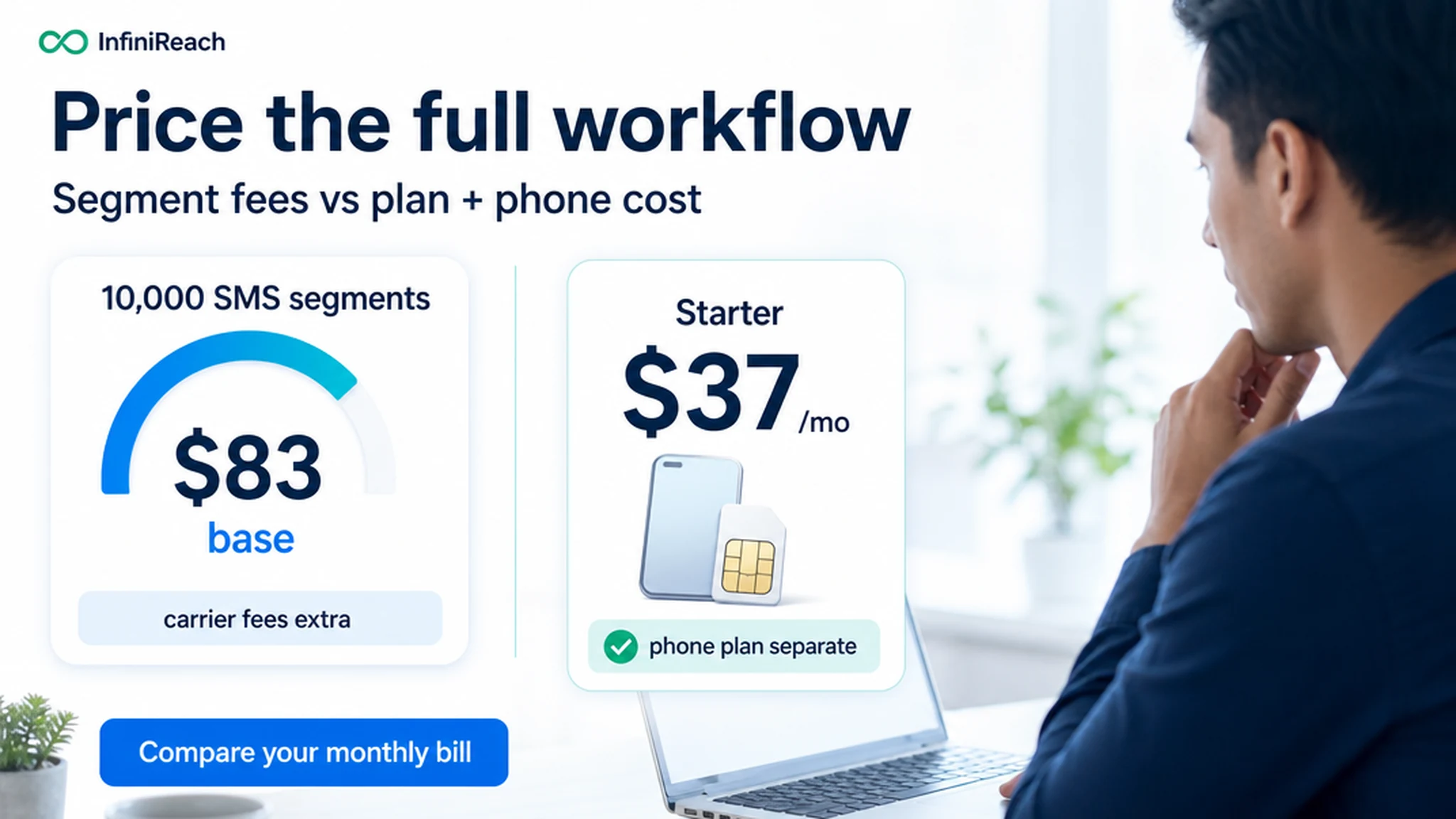
Suppose a spreadsheet workflow sends 8,000 US SMS segments and receives 2,000. Twilio’s published base rate is $0.0083 per outbound or inbound long-code segment. The base message subtotal is 10,000 × $0.0083 = $83, before carrier fees, number charges, registration, and any other applicable fees.
InfiniReach takes a different cost shape. The public Starter plan is $37 per month and includes two connected gateways; your phone plan and SIM are separate costs. Compare those actual costs with the hosted provider’s full bill, and confirm that the connected-device route and its operating limits fit your volume. This example is a benchmark, not a promise that every workflow costs less.
what should operators check before enabling replies?
A webhook makes a reply easier to process; it does not grant permission to message. Keep the contact’s consent and opt-out state in the source record. Make sure a STOP request or other opt-out reaches the system that controls future sends, not just a spreadsheet note.
Limit who can edit the automation and the destination URL. Avoid placing API keys in a sheet cell or public script. InfiniReach supports signed outbound webhook requests when a secret is configured; verify the signature on the raw request body before trusting or processing the payload.
what happens when a webhook or device is offline?
Treat the webhook as a production dependency. Record each received event, return an appropriate response, and design a safe retry or review path for temporary failures. Prevent duplicate updates by storing an event or message identifier and making the row update idempotent where your receiver allows it.
For SMS, the connected Android phone and SIM must be available. For WhatsApp, the connected session must remain in a usable state. Make the workflow surface failed or disconnected states so an operator can investigate instead of assuming a missing reply means the customer ignored the message.
which spreadsheet workflows benefit from reply tracking?
Reply tracking fits cases where a person’s answer changes the next step. It is less useful for a sheet that only sends announcements and nobody monitors.
- Appointment confirmation: mark the booking as confirmed or send it to staff for review.
- Lead qualification: route a positive answer to the assigned salesperson and pause scheduled nudges.
- Quote follow-up: capture a question and create a callback task instead of sending another automated prompt.
- Service coordination: add a customer response to the work order and notify the person on duty.
when a hosted messaging API is the better fit
Choose a hosted CPaaS route when your application needs its carrier network, global OTP delivery, short codes, or high-volume throughput that a connected phone cannot provide. Twilio’s model charges per segment and adds fees that vary by destination and sender setup; that tradeoff can be right when provider-managed infrastructure is the requirement.
An own-device route is not a way around consent, carrier rules, or local law. A2P 10DLC registration, campaign review, and approval can take time on hosted long-code paths, but the right choice depends on destination, message type, volume, and provider requirements. InfiniReach is not a compliance shortcut.
a practical setup checklist for the first workflow
Start with one sheet, one connected number, and a small group of contacts who expect the message. Map the return path before you switch on the send trigger. Keep a person responsible for replies that need judgment.
- Choose the sheet columns for recipient, contact key, sender, channel, send state, reply, and owner.
- Connect WhatsApp and any Android SIM sender you plan to use for SMS.
- Call the API with explicit `from` and `channel` values.
- Configure the webhook event and verify the request before updating the sheet.
- Test delivered, failed, inbound-reply, duplicate-event, and no-match cases.
- Add send windows, daily SIM limits, consent checks, and a human handoff.
next step: price and test one reply loop
Pick one workflow where a reply changes a real decision. Write down the trigger, sending number, channel, event receiver, row-matching rule, and human owner. Then test a single outbound message and confirm the inbound reply updates the correct record.
If the flow needs a connected number, WhatsApp plus Android-SIM SMS, and webhook-based follow-up, compare the plan against your current per-segment bill at `/pricing`. Start with one workflow, not a full contact import.